Bot Talk API
Bot Talk API è una REST API per comunicare con uno specifico chatbot dalla tua applicazione - app personalizzate, strumenti interni o automazioni sviluppate in autonomia. Crea una chiave API nella scheda API del bot, quindi chiama l'endpoint di chat passando la chiave come Bearer token per ricevere le risposte del bot, come risposta singola o in streaming tramite SSE.
Per iniziare
- Seleziona il tuo chatbot e vai alla scheda API nella parte superiore della pagina del bot (Select Bot > API - Seleziona bot > API).
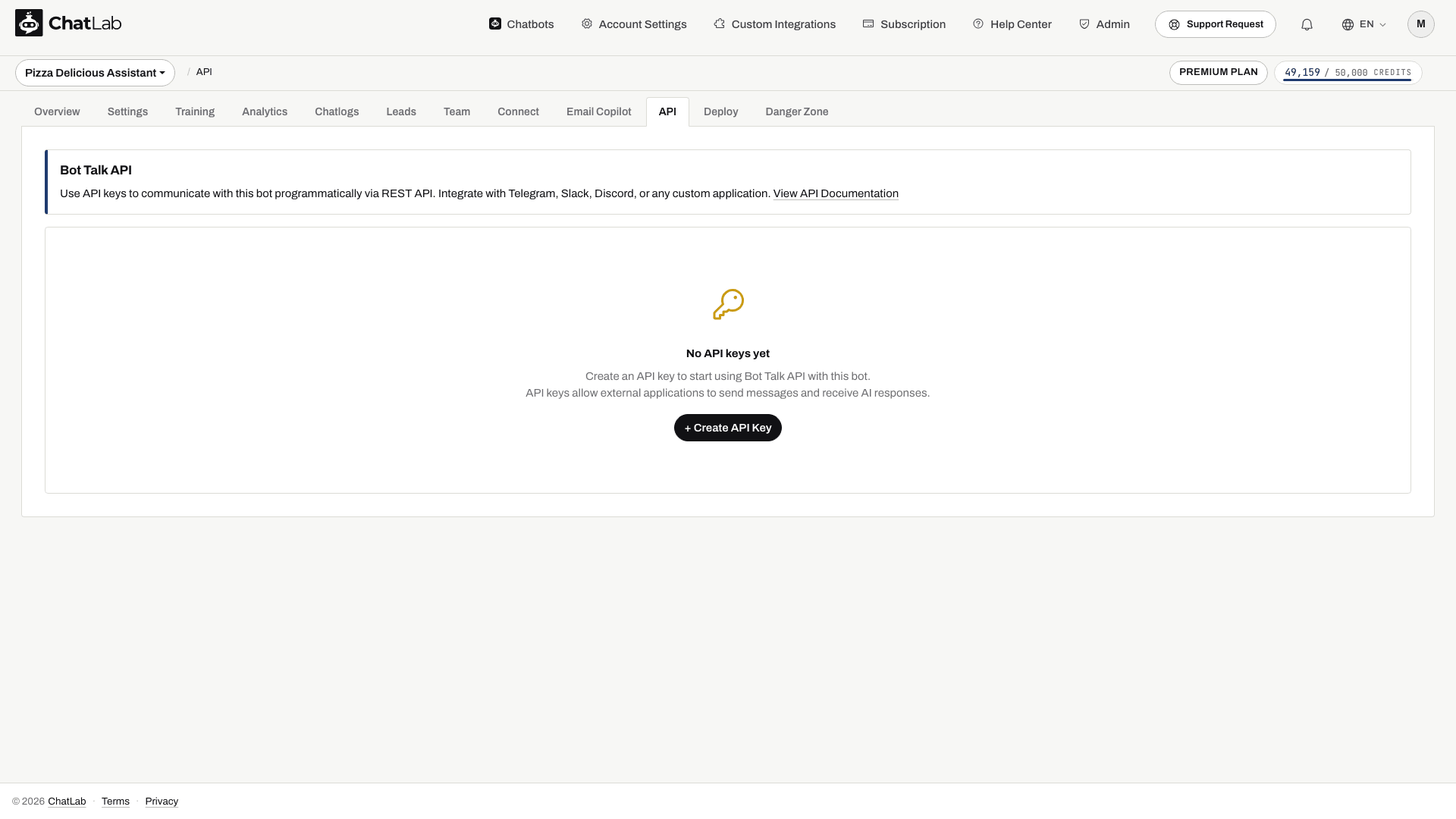
- Fai clic su Create API Key (Crea chiave API).
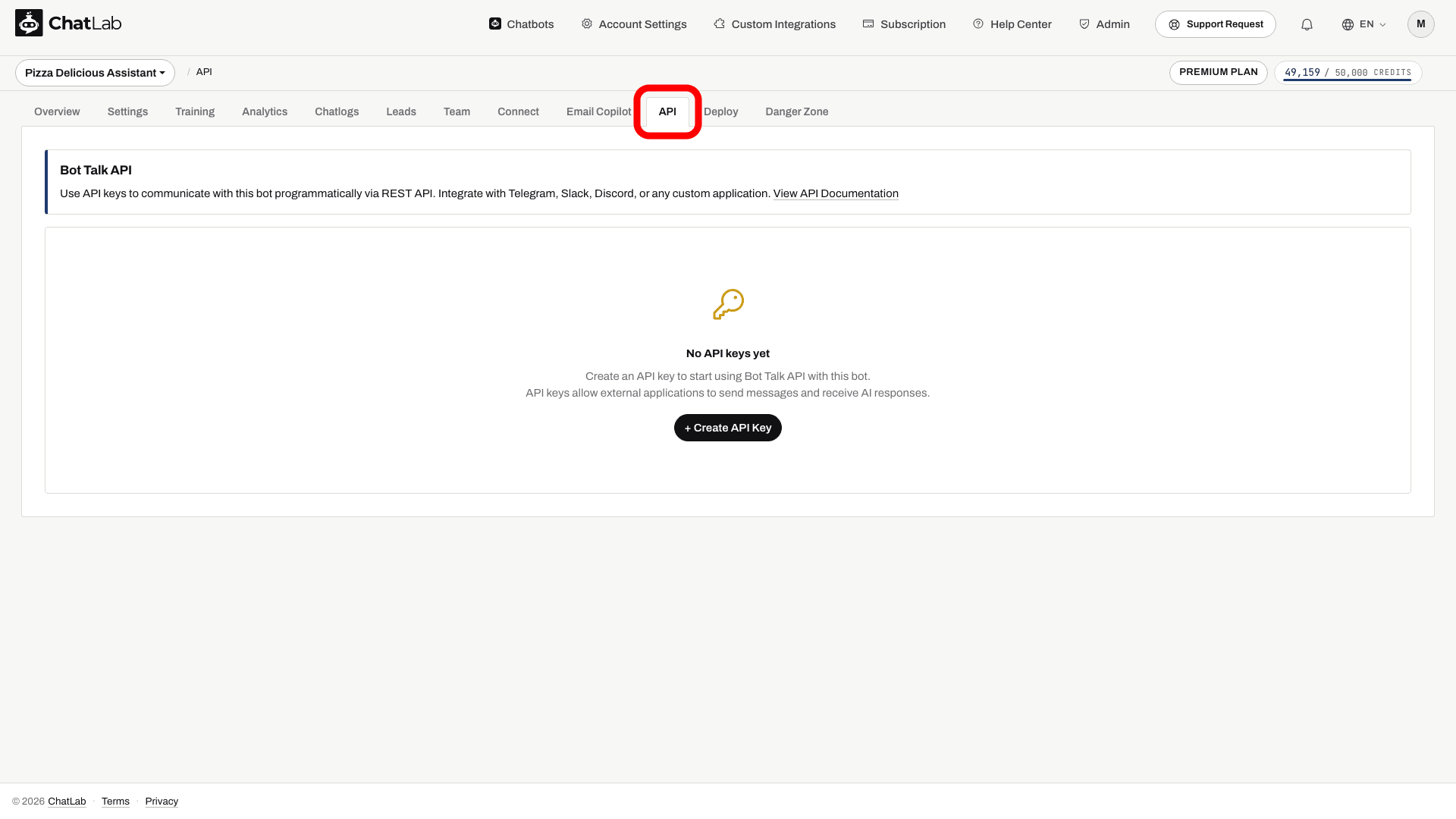
Il contatore accanto al pulsante mostra quante chiavi sono attive ("1 of 5 API keys active"). Il link View API Documentation (Visualizza documentazione API) apre questo riferimento, mentre lo snippet curl Quick Start (Avvio rapido) ti fornisce un esempio pronto all'uso.
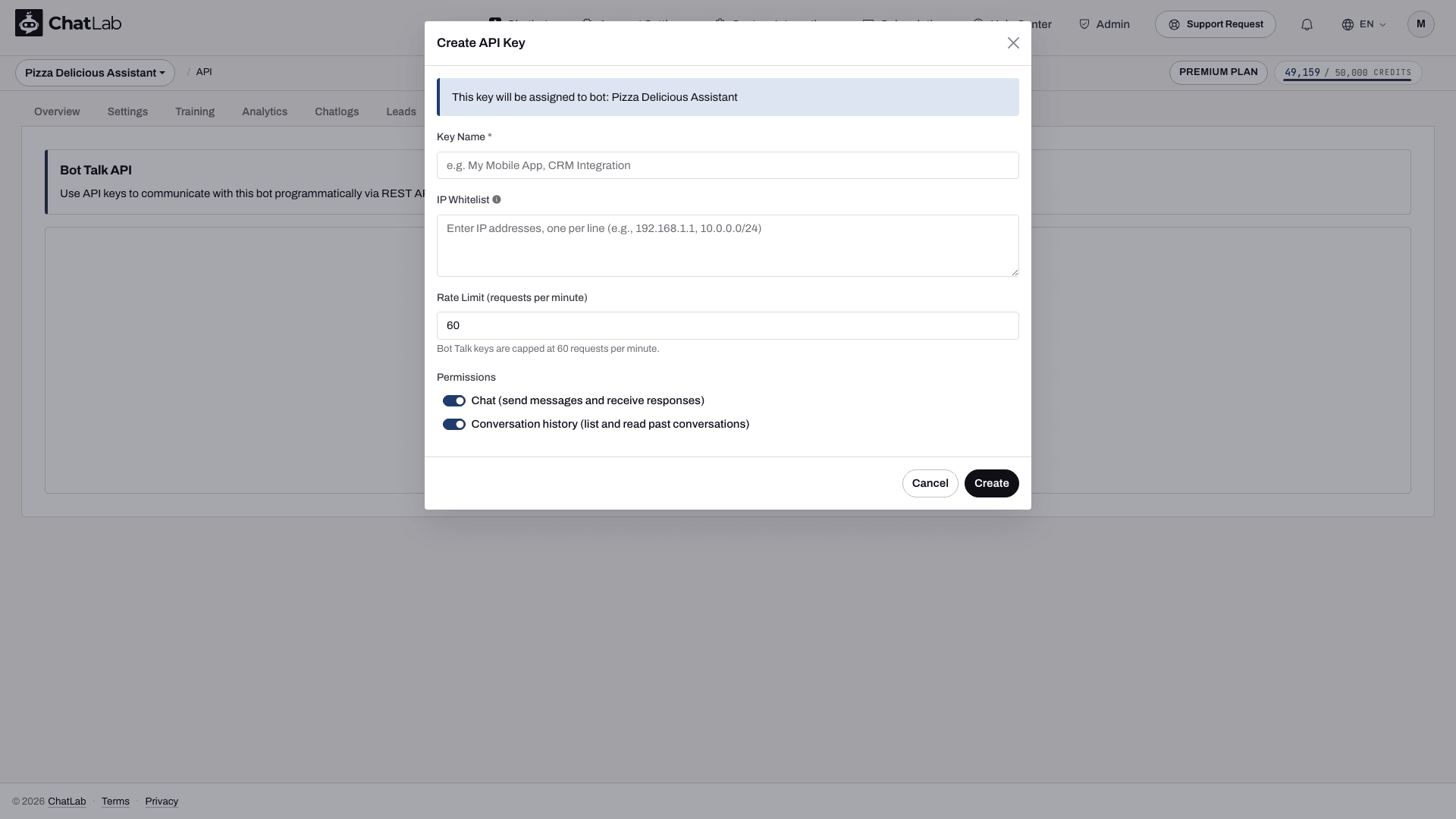
- Nella finestra di dialogo Create API Key (Crea chiave API), assegna un nome alla chiave, imposta facoltativamente una whitelist di IP e un limite di frequenza, scegli i permessi da assegnare e fai clic su Create (Crea).
- Copia l'intera chiave dalla finestra di conferma. Il testo in chiaro viene mostrato una sola volta.
Una chiave ha un formato simile a ck_abcdefghijklmnopqrstuvwxyz012345. Ogni chiave appartiene a quello specifico bot, quindi ogni richiesta effettuata con la chiave interagisce con quel bot - il bot viene identificato dalla chiave e non compare mai nell'URL.
- Dal tuo server, esegui l'esempio curl qui sotto con la tua chiave e un breve messaggio di prova. Salva il valore
conversationIdrestituito, quindi riutilizzalo per i messaggi successivi. Verifica la risposta e la conversazione nella scheda Chatlogs (Registri chat) del bot.
Conserva le chiavi ck_ sul tuo server, non nel codice JavaScript del sito web o nei pacchetti dell'app mobile. Il permesso Conversations consente di accedere a tutte le conversazioni memorizzate di questo bot tra i vari visitatori, quindi la tua applicazione deve autorizzare ogni utente finale prima di restituire tali dati. Usa Revoke (Revoca) o Delete (Elimina) nella scheda API per disattivare una chiave; nessuna delle due azioni mostrerà nuovamente la chiave in chiaro.
Prima di iniziare, crea e addestra il tuo chatbot e verifica che il tuo account includa l'accesso alle API e disponga di crediti per i messaggi.
Base URL
https://api.chatlab.com/aichat
Tutti gli endpoint in questo articolo sono relativi a questo URL di base.
Permessi della chiave
Ogni chiave include uno o entrambi questi permessi, impostati con gli interruttori nella finestra Create API Key:
- Chat (send messages and receive responses) [Chat (invia messaggi e ricevi risposte)] - consente l'accesso agli endpoint
/v1/chate/v1/chat/stream. - Conversation history (list and read past conversations) [Cronologia conversazioni (elenca e leggi le conversazioni passate)] - consente l'accesso agli endpoint
/v1/conversations.
La scheda API mostra i permessi concessi a ciascuna chiave tramite i badge Chat e Conversations (Conversazioni).
Autenticazione
Invia la chiave nell'header Authorization a ogni richiesta:
Authorization: Bearer ck_abcdefghijklmnopqrstuvwxyz012345
Le richieste prive dell'header Authorization: Bearer ... restituiscono 401 missing_api_key. Le chiavi sconosciute restituiscono 401 invalid_api_key; le chiavi revocate restituiscono 401 revoked_api_key. Cinque tentativi non validi in un minuto dallo stesso indirizzo IP attivano un blocco di 60 minuti.
Limiti
- Massimo 5 chiavi Bot Talk attive per bot
- Massimo 60 richieste al minuto per chiave (token bucket, capacità 60, ricarica graduale a 1 token al secondo). Configurabile al ribasso al momento della creazione: impostando un valore
rateLimitPerMinuteinferiore, il limite massimo si riduce e la frequenza di ricarica si adatta di conseguenza. - Lunghezza massima del messaggio: 4.000 caratteri
- Gli stream SSE simultanei per chiave sono soggetti ai limiti del tuo account
Endpoint
POST /v1/chat
Invia un messaggio al bot e ricevi la risposta completa in un'unica risposta JSON.
Corpo della richiesta
{
  "message": "Hi, can you help me track my order?",
  "conversationId": "550e8400-e29b-41d4-a716-446655440000",
  "metadata": {"userEmail": "alice@example.com"}
}
message- stringa obbligatoria, max 4000 caratteri.conversationId- UUID opzionale. Ometti per una nuova conversazione; riutilizza il valore restituito in precedenza dal server per aggiungere messaggi a una conversazione esistente.metadata- oggetto opzionale che accetta{source, userName, userEmail, userPhone}. Attualmente qui viene utilizzato solouserEmail, per ricavare l'identificatore del client; il canale viene registrato come API. Non fare affidamento sul fatto che gli altri campi di metadati vengano salvati in un record di lead.
Corpo della risposta (200)
{
  "message": {"role": "assistant", "content": "Sure, what's your order number?"},
  "conversationId": "550e8400-e29b-41d4-a716-446655440000",
  "model": "5.6-LUNA",
  "usage": {"creditsUsed": 2},
  "actions": []
}
message.roleè sempre"assistant";message.contentè la risposta completa.modelè l'ID del modello su cui è stato eseguito il bot per questa chiamata.usage.creditsUsedattualmente riporta 2 più uno per ogni chiamata a tool segnalata per un turno completato. Questo contatore restituito nella risposta non include i moltiplicatori di crediti per modello/contesto e non deve essere utilizzato come registro di fatturazione. Utilizza i dati di consumo della Management API per il consumo dell'account e consulta crediti per i messaggi.actionselenca le esecuzioni di tool eseguite durante questo turno. Attualmente vengono emesse solo vocifunction_call(contype,name,status: "completed").
POST /v1/chat/stream
Variante in streaming di /v1/chat. Restituisce Content-Type: text/event-stream con Server-Sent Events.
Corpo della richiesta
Stessa struttura di POST /v1/chat. Il flag stream nel corpo non è richiesto - è l'uso di questo percorso che attiva gli SSE.
Corpo della risposta (eventi SSE)
message.reset- scarta il testo accumulato per la risposta corrente e ricomincia a raccogliere i delta. Ciò può verificarsi quando la generazione si riavvia; l'aggiunta di entrambe le versioni mostrerebbe una risposta duplicata o superata.message.delta- frammento di contenuto{ "content": "..." }. Ne vengono inviati diversi in streaming man mano che arrivano i token.action- esecuzione di tool{ "type", "name", "status": "executing" }. Emesso quando il bot attiva una chiamata a una funzione.message.done- evento terminale conconversationId,model,usagee (se presente) l'elenco completatoactions.error- inviato se la generazione fallisce; successivamente lo stream si interrompe.
I commenti SSE di keep-alive (:keepalive) vengono inviati ogni 15 secondi durante le generazioni lunghe. Timeout lato server: 30 secondi per il primo token, 120 secondi totali per stream.
Esempio cURL
curl -N -X POST https://api.chatlab.com/aichat/v1/chat/stream \
  -H "Authorization: Bearer ck_..." \
  -H "Content-Type: application/json" \
  -d '{"message":"hello"}'
GET /v1/conversations
Elenca le conversazioni per il bot associato alla tua chiave, su tutte le sorgenti (widget, WhatsApp, API, ecc.).
Parametri di query
limit- 1-100, predefinito 20. I valori al di fuori dell'intervallo vengono limitati.cursor- valore opaco restituito innextCursornella pagina precedente. Ometti per la prima pagina.
Corpo della risposta (200)
{
  "data": [
    {
      "conversationId": "550e8400-e29b-41d4-a716-446655440000",
      "createdAt": "2026-05-10T14:11:02Z",
      "lastMessageAt": "2026-05-10T14:12:34Z",
      "messageCount": 6,
      "lastMessagePreview": "Thanks for the help."
    }
  ],
  "hasMore": false,
  "nextCursor": null
}
lastMessagePreviewè troncato a 100 caratteri con un suffisso....nextCursorènullsull'ultima pagina; passalo comecursorper recuperare la successiva.
GET /v1/conversations/{conversation_id}
Messaggi della conversazione conservati ed esposti da questo endpoint.
Corpo della risposta (200)
{
  "conversationId": "550e8400-e29b-41d4-a716-446655440000",
  "createdAt": "2026-05-10T14:11:02Z",
  "lastMessageAt": "2026-05-10T14:12:34Z",
  "messageCount": 6,
  "messages": [
    {"role": "user", "content": "Hi", "createdAt": "2026-05-10T14:11:02Z"},
    {"role": "assistant", "content": "Hello! How can I help?", "createdAt": "2026-05-10T14:11:03Z"}
  ]
}
Vengono restituiti solo i ruoli user e assistant; i messaggi interni system e i messaggi dei tool vengono filtrati. Restituisce 404 not_found_error se la conversazione non appartiene al bot associato alla tua chiave.
Per esaminare la configurazione del bot, utilizza l'endpoint di Management API GET /v1/management/bots/{bot_id} con una chiave Management.
Header del rate limit
Le risposte che raggiungono la fase di controllo del rate limit (ovvero dopo aver superato l'autenticazione e la whitelist IP) includono:
X-RateLimit-Limit: 60
X-RateLimit-Remaining: 57
X-RateLimit-Reset: 1715430000
X-RateLimit-Limit- il limite per chiave effettivamente applicato a questa chiamata (60 per impostazione predefinita, o il valore configurato inrateLimitPerMinutese inferiore).X-RateLimit-Remaining- token rimanenti nel bucket subito dopo questa chiamata.X-RateLimit-Reset- timestamp Unix in secondi in cui diventa disponibile il token successivo (non si tratta di un ripristino completo del bucket; il bucket si ricarica continuamente). Quando il bucket è pieno, coincide con l'ora corrente.
Nelle risposte 429 rate_limit_exceeded, viene impostato anche l'header Retry-After, espresso in secondi interi fino a quando non si libera almeno un token.
Gli errori precedenti all'autenticazione (401 missing_api_key, 401 invalid_api_key, 403 ip_blocked) e 403 ip_not_whitelisted non contengono gli header X-RateLimit-*: il rate limiter viene infatti consultato solo dopo il superamento dei controlli di autenticazione e IP.
Formato degli errori
Tutti gli errori condividono un unico envelope:
{
  "error": {
    "type": "rate_limit_error",
    "code": "rate_limit_exceeded",
    "message": "Rate limit exceeded. Try again in 12 seconds.",
    "param": null
  }
}
Codici HTTP comuni:
400 invalid_request_error- input non valido (invalid_parameter)415 invalid_request_error- content type non supportato (unsupported_media_type)401 authentication_error- chiave mancante (missing_api_key), chiave sconosciuta (invalid_api_key) o chiave revocata (revoked_api_key)402 quota_exceeded_error- crediti dei messaggi esauriti403 permission_error- IP bloccato (ip_blocked), IP non presente nella whitelist della chiave (ip_not_whitelisted) o tipo di chiave che non consente questo endpoint (key_type_not_allowed,insufficient_permissions)404 not_found_error- la conversazione non appartiene a questo bot405 invalid_request_error(method_not_allowed) - verbo HTTP errato sull'URL429 rate_limit_error- troppe richieste (rate_limit_exceeded) o troppi stream simultanei (concurrent_streams_exceeded)500 api_error- errore interno
Risorse correlate
Per le operazioni a livello di account (creazione bot, aggiornamento bot, consultazione dei consumi), consulta la Management API.