Bot Talk API
The Bot Talk API is a REST API for talking to one specific chatbot from your own application - custom apps, internal tools, or automations you build yourself. You create an API key on the bot's API tab, then call the chat endpoint with the key as a Bearer token to get the bot's replies, either as a single response or streamed over SSE.
Getting started
- Select your chatbot and navigate to the API tab at the top of the bot page (Select Bot > API).
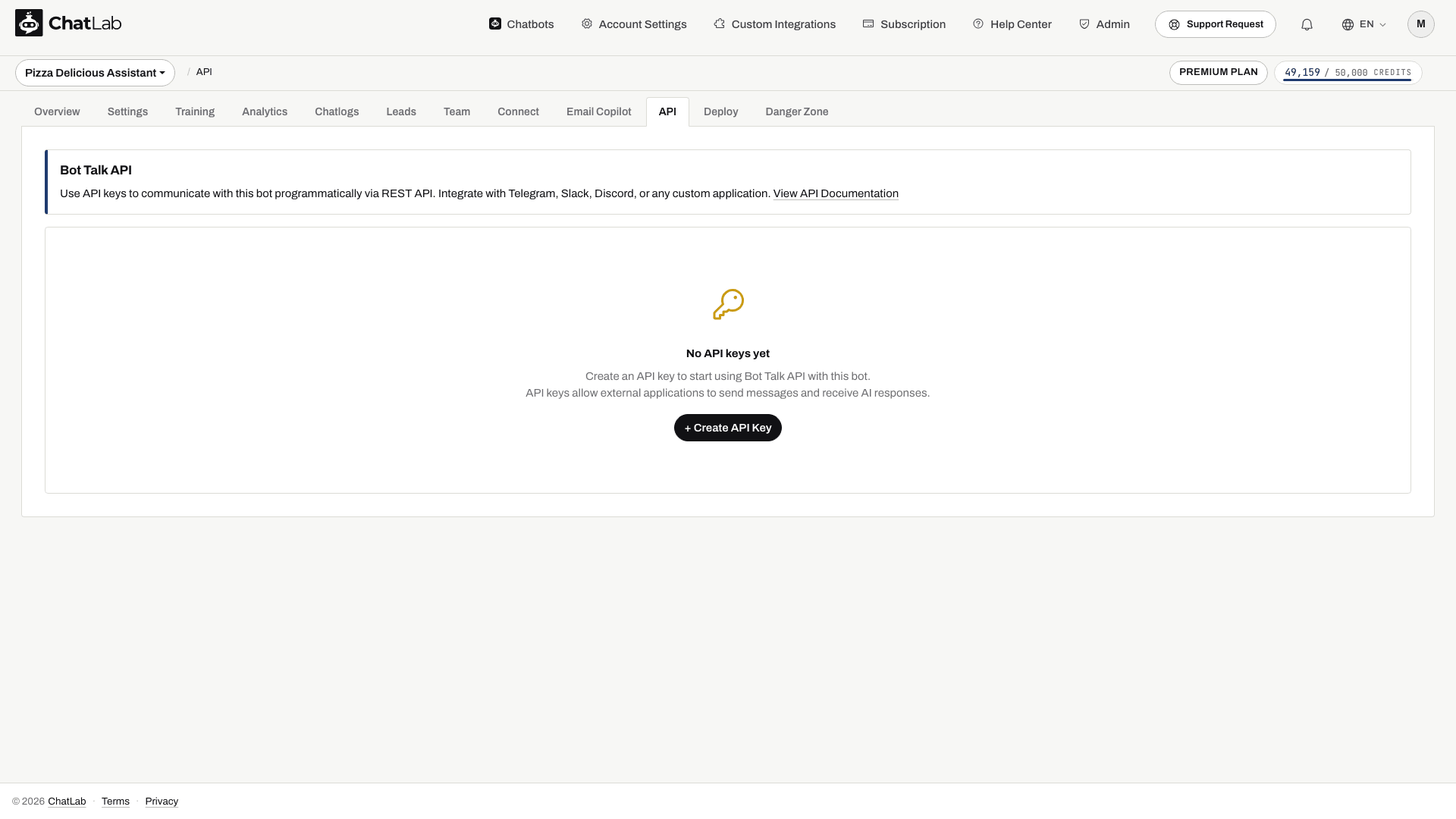
- Click Create API Key.
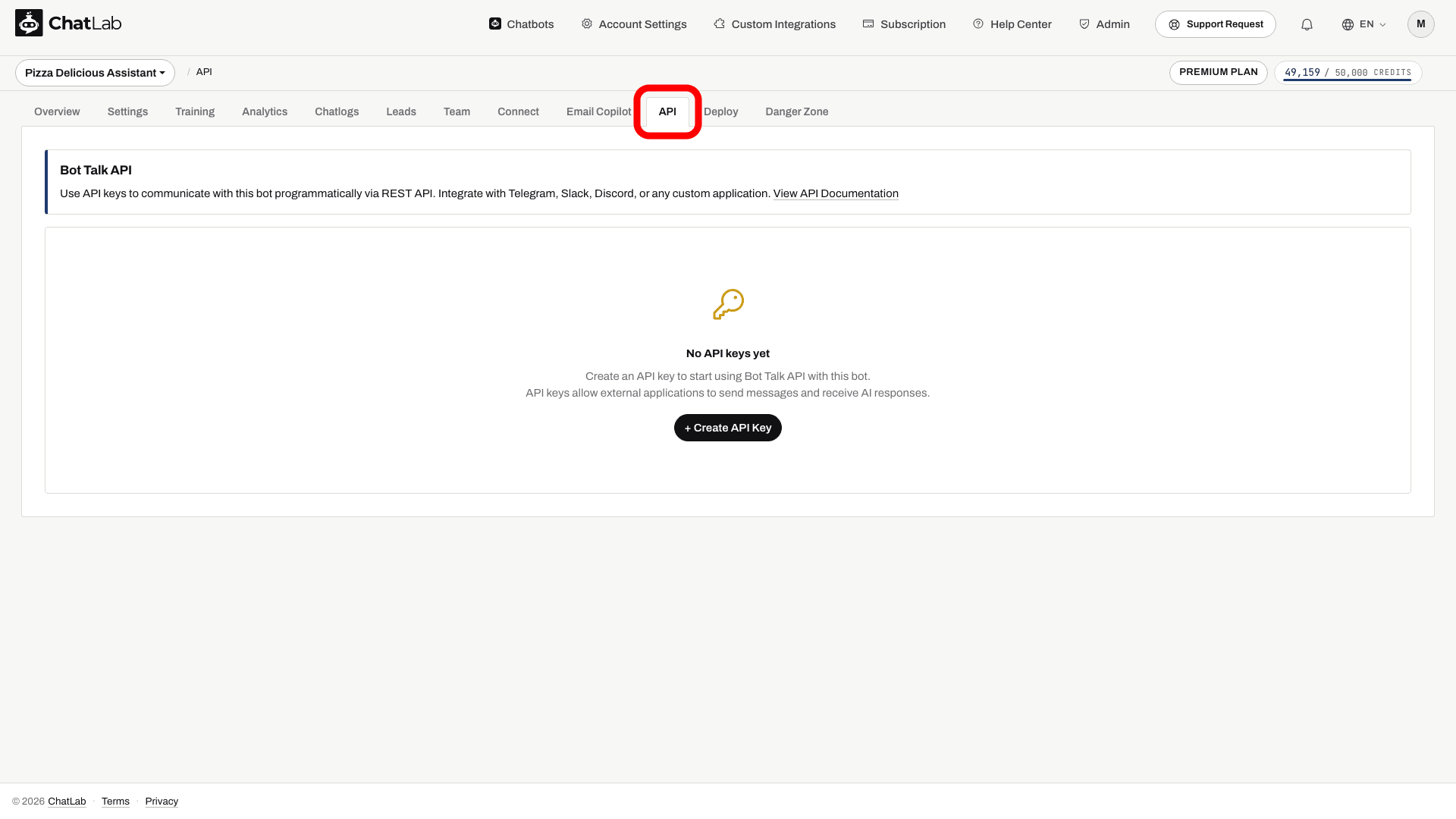
The counter next to the button shows how many keys are active ("1 of 5 API keys active"). The View API Documentation link opens this reference, and the Quick Start curl snippet gives you a ready-to-run example.
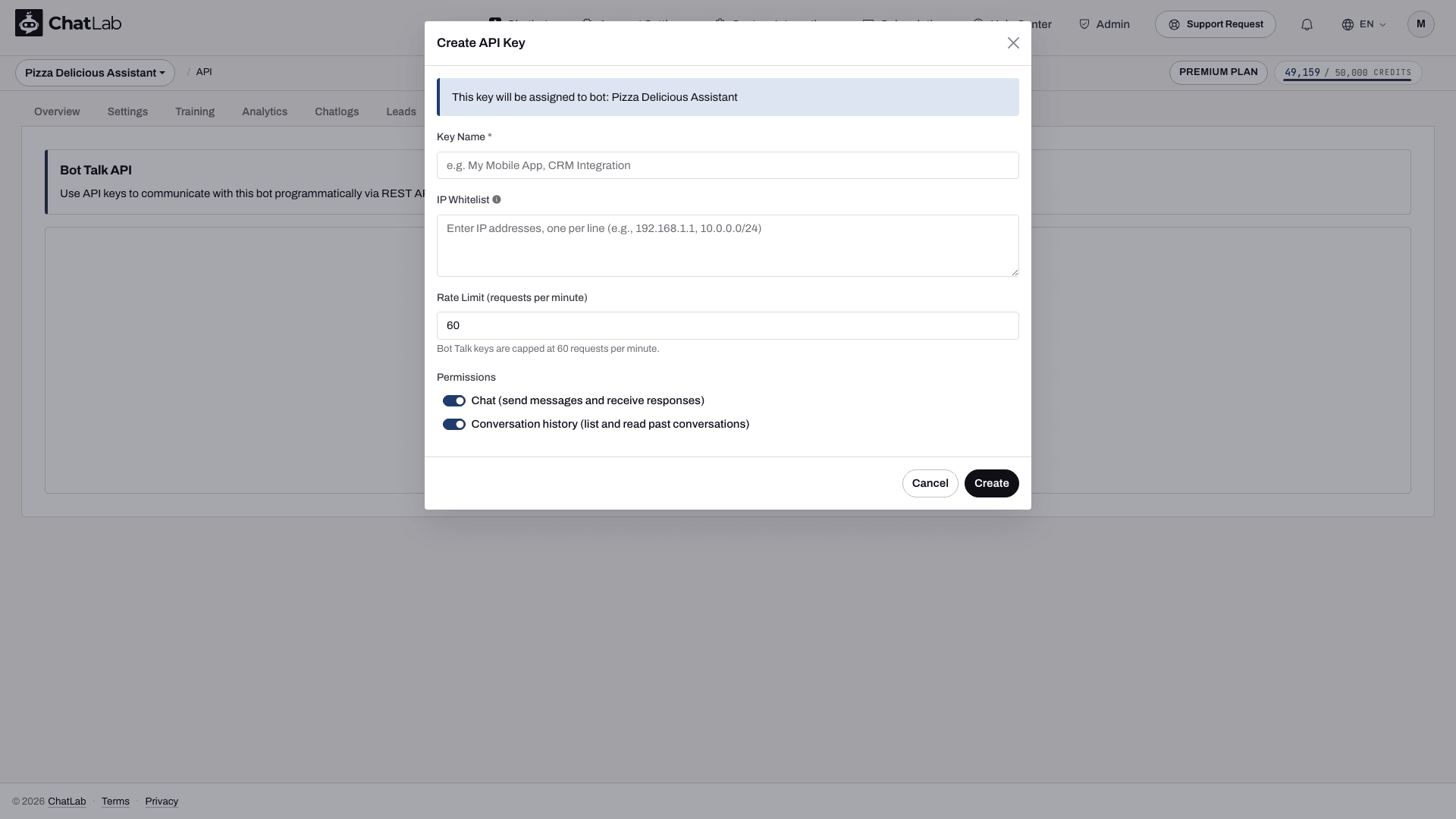
- In the Create API Key dialog, give the key a name, optionally set an IP whitelist and a rate limit, choose which permissions it has, then click Create.
- Copy the full key from the success dialog. The plaintext is shown only once.
A key looks like ck_abcdefghijklmnopqrstuvwxyz012345. Each key belongs to that one bot, so every request made with the key talks to that bot - the bot is identified by the key and never appears in the URL.
- From your server, run the curl example below with your key and a short test message. Store the returned
conversationId, then reuse it for a follow-up. Confirm the reply and conversation in the bot's Chatlogs tab.
Keep ck_ keys on your server, not in website JavaScript or mobile app bundles. A Conversations permission grants access to this bot's retained conversations across visitors, so your application must authorize each end user before returning that data. Use Revoke or Delete on the API tab to retire a key; neither action reveals its plaintext again.
Before starting, create and train your chatbot and check that your account includes API access and has message credits.
Base URL
https://api.chatlab.com/aichat
All endpoints in this article are relative to this base URL.
Key permissions
Each key carries one or both of these permissions, set with the toggles in the Create API Key dialog:
- Chat (send messages and receive responses) - allows the
/v1/chatand/v1/chat/streamendpoints. - Conversation history (list and read past conversations) - allows the
/v1/conversationsendpoints.
The API tab shows each key's granted permissions as Chat and Conversations badges.
Authentication
Send the key in the Authorization header on every request:
Authorization: Bearer ck_abcdefghijklmnopqrstuvwxyz012345
Requests without an Authorization: Bearer ... header return 401 missing_api_key. Unknown keys return 401 invalid_api_key; revoked keys return 401 revoked_api_key. Five invalid attempts in a minute from the same IP trigger a 60-minute block.
Limits
- Max 5 active Bot Talk keys per bot
- Max 60 requests per minute per key (token bucket, capacity 60, smooth refill at 1 token per second). Configurable downward at create time - set a lower
rateLimitPerMinuteand the cap drops, refill rate scales with it. - Max message length 4000 characters
- Concurrent SSE streams per key are subject to your account limits
Endpoints
POST /v1/chat
Send a message to the bot and receive the full reply in a single JSON response.
Request body
{
  "message": "Hi, can you help me track my order?",
  "conversationId": "550e8400-e29b-41d4-a716-446655440000",
  "metadata": {"userEmail": "alice@example.com"}
}
message- required string, max 4000 chars.conversationId- optional UUID. Omit for a new conversation; reuse the value the server returned previously to append to an existing one.metadata- optional object accepting{source, userName, userEmail, userPhone}. Currently onlyuserEmailis used here, to derive the client identifier; the channel is recorded as API. Do not rely on the other metadata fields being saved to a lead record.
Response body (200)
{
  "message": {"role": "assistant", "content": "Sure, what's your order number?"},
  "conversationId": "550e8400-e29b-41d4-a716-446655440000",
  "model": "5.6-LUNA",
  "usage": {"creditsUsed": 2},
  "actions": []
}
message.roleis always"assistant";message.contentis the full reply.modelis the model id the bot ran on for this call.usage.creditsUsedcurrently reports 2 plus one per reported tool call for a completed turn. This response counter does not include model/context credit multipliers and must not be used as your billing ledger. Use Management API usage for account consumption and see message credits.actionslists tool executions that ran during this turn. Today onlyfunction_callentries are emitted (withtype,name,status: "completed").
POST /v1/chat/stream
Streaming variant of /v1/chat. Returns Content-Type: text/event-stream with Server-Sent Events.
Request body
Same shape as POST /v1/chat. The stream flag in the body is not required - using this path is what triggers SSE.
Response body (SSE events)
message.reset- discard the text accumulated for the current reply and start collecting deltas again. This can occur when generation restarts; appending both versions would show a duplicate or superseded answer.message.delta- content fragment{ "content": "..." }. Multiple of these stream as tokens arrive.action- tool execution{ "type", "name", "status": "executing" }. Emitted when the bot triggers a function call.message.done- terminal event withconversationId,model,usage, and (if any) the completedactionslist.error- sent if generation fails; the stream terminates afterward.
Keep-alive SSE comments (:keepalive) are sent every 15 seconds during long generations. Server-side timeouts: 30 seconds for the first token, 120 seconds total per stream.
Curl example
curl -N -X POST https://api.chatlab.com/aichat/v1/chat/stream \
  -H "Authorization: Bearer ck_..." \
  -H "Content-Type: application/json" \
  -d '{"message":"hello"}'
GET /v1/conversations
List conversations for the bot bound to your key, across all sources (widget, WhatsApp, API, etc).
Query parameters
limit- 1-100, default 20. Values outside the range are clamped.cursor- opaque value returned innextCursoron the previous page. Omit for the first page.
Response body (200)
{
  "data": [
    {
      "conversationId": "550e8400-e29b-41d4-a716-446655440000",
      "createdAt": "2026-05-10T14:11:02Z",
      "lastMessageAt": "2026-05-10T14:12:34Z",
      "messageCount": 6,
      "lastMessagePreview": "Thanks for the help."
    }
  ],
  "hasMore": false,
  "nextCursor": null
}
lastMessagePreviewis truncated to 100 characters with a...suffix.nextCursorisnullon the last page; pass it ascursorto fetch the next.
GET /v1/conversations/{conversation_id}
Retained conversation messages exposed by this endpoint.
Response body (200)
{
  "conversationId": "550e8400-e29b-41d4-a716-446655440000",
  "createdAt": "2026-05-10T14:11:02Z",
  "lastMessageAt": "2026-05-10T14:12:34Z",
  "messageCount": 6,
  "messages": [
    {"role": "user", "content": "Hi", "createdAt": "2026-05-10T14:11:02Z"},
    {"role": "assistant", "content": "Hello! How can I help?", "createdAt": "2026-05-10T14:11:03Z"}
  ]
}
Only user and assistant roles are returned; internal system and tool messages are filtered out. Returns 404 not_found_error if the conversation does not belong to the bot bound to your key.
To inspect bot configuration, use the Management API endpoint GET /v1/management/bots/{bot_id} with a Management key.
Rate limit headers
Responses that reach the rate-limit stage (i.e. auth and IP whitelist passed) include:
X-RateLimit-Limit: 60
X-RateLimit-Remaining: 57
X-RateLimit-Reset: 1715430000
X-RateLimit-Limit- the per-key cap actually applied to this call (60 by default, or your configuredrateLimitPerMinuteif lower).X-RateLimit-Remaining- tokens left in the bucket right after this call.X-RateLimit-Reset- Unix epoch seconds at which the next token becomes available (not a full bucket reset; the bucket refills continuously). When the bucket is full, this is the current time.
On 429 rate_limit_exceeded responses, Retry-After is also set, expressed in whole seconds until at least one token frees up.
Pre-auth errors (401 missing_api_key, 401 invalid_api_key, 403 ip_blocked) and 403 ip_not_whitelisted do not carry the X-RateLimit-* headers - the limiter is only consulted after authentication and IP checks succeed.
Error format
All errors share a single envelope:
{
  "error": {
    "type": "rate_limit_error",
    "code": "rate_limit_exceeded",
    "message": "Rate limit exceeded. Try again in 12 seconds.",
    "param": null
  }
}
Common HTTP codes:
400 invalid_request_error- malformed input (invalid_parameter)415 invalid_request_error- unsupported content type (unsupported_media_type)401 authentication_error- missing key (missing_api_key), unknown key (invalid_api_key), or revoked key (revoked_api_key)402 quota_exceeded_error- message credits exhausted403 permission_error- IP blocked (ip_blocked), IP not in the key's whitelist (ip_not_whitelisted), or key type does not allow this endpoint (key_type_not_allowed,insufficient_permissions)404 not_found_error- conversation does not belong to this bot405 invalid_request_error(method_not_allowed) - wrong HTTP verb on the URL429 rate_limit_error- too many requests (rate_limit_exceeded) or too many concurrent streams (concurrent_streams_exceeded)500 api_error- internal error
Related
For account-level operations (creating bots, updating bots, fetching usage), see Management API.