Questa guida spiega come instradare le chiamate telefoniche reali al tuo assistente vocale ChatLab, indipendentemente dalla telefonia che utilizzi attualmente - un moderno numero VoIP, un nuovo numero o una linea esistente su un vecchio centralino PBX. Per abilitare la funzione in ChatLab e ottenere l'indirizzo SIP del tuo numero, consulta prima l'articolo Chiamate telefoniche; questa guida si concentra sulla parte telefonica: far arrivare una chiamata dal mondo esterno a quell'indirizzo SIP.
Come funziona
La telefonia attuale si divide in due "mondi":
- Telefonia tradizionale (legacy) - linee ISDN/analogiche e centralini PBX on-premise. Le chiamate viaggiano sulle linee dell'operatore, non su Internet.
- Telefonia VoIP - numeri e chiamate trasmessi "tramite SIP" (il protocollo di telefonia via Internet). È qui che operano i servizi moderni, incluso l'assistente vocale ChatLab.
L'assistente ha un indirizzo nel mondo VoIP chiamato SIP URI (pensalo come un "indirizzo Internet" per la linea telefonica). Affinché una chiamata raggiunga l'assistente, il numero deve entrare nel mondo VoIP a un certo punto. Questo avviene grazie a un provider VoIP - un'azienda che fornisce numeri e telefonia su Internet, ad esempio Zadarma (pannello web semplice, scelta molto diffusa), oppure Twilio / Telnyx (internazionali, più tecnici).
Il tuo compito si riduce a due passaggi:
- far arrivare la chiamata a un numero gestito da un provider VoIP, e
- nel pannello di tale provider, impostare un inoltro verso il SIP URI dell'assistente.
L'assistente opera nel cloud - non devi installare nulla da parte tua o sul tuo PBX.
Prima di iniziare: ottieni il tuo URI SIP
Abilita la voce sul bot e registra il tuo numero in ChatLab per ottenere l'indirizzo SIP esatto a cui inoltrare le chiamate. I passaggi completi (abilitare ElevenLabs Voice, copiare l'URI SIP, registrare il numero, impostare i limiti di sicurezza) sono disponibili nell'articolo Chiamate telefoniche. Otterrai un valore simile a:
+1XXXXXXXXXX@sip.rtc.elevenlabs.io:5060;transport=tcp
Usa l'URI esatto del numero registrato in ChatLab. L'endpoint supporta TCP sulla porta 5060 o TLS sulla porta 5061; il trasporto deve corrispondere alla porta scelta. Consulta i requisiti per il trunking SIP di ElevenLabs. Tale URI è la destinazione a cui puntano tutte le opzioni descritte di seguito.
Scegli la tua configurazione
Scegli il percorso che corrisponde alla tua situazione attuale.
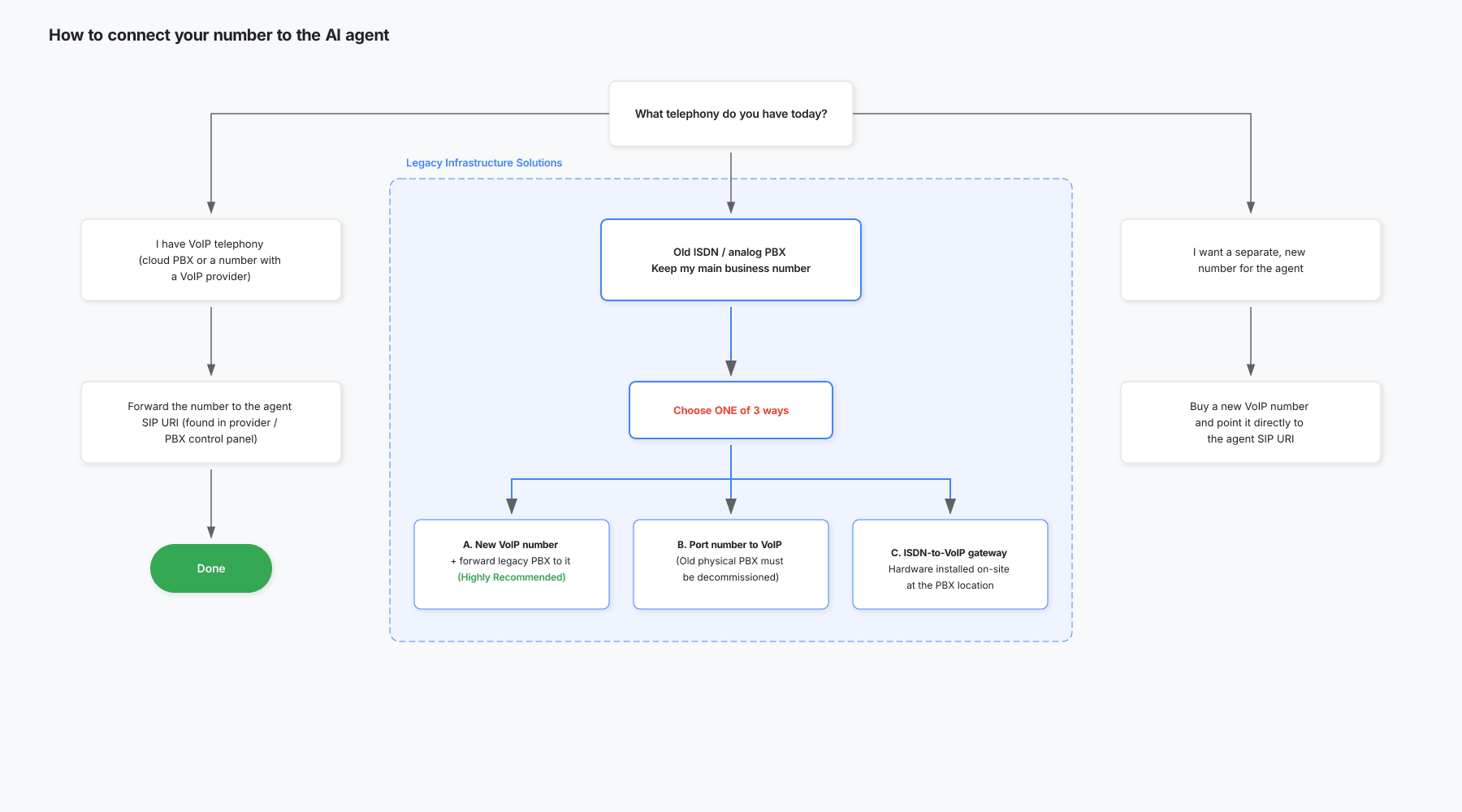
Opzione 1 - hai già una telefonia VoIP
Questo presuppone che la tua telefonia parli già "SIP": un centralino VoIP/cloud (ad esempio 3CX, FreePBX o un centralino cloud del tuo provider), oppure un numero ospitato direttamente presso un operatore VoIP. Ti basterà quindi impostare un inoltro:
- Accedi al pannello del tuo operatore VoIP (o al tuo centralino VoIP).
- Trova l'inoltro di chiamata per il numero o l'interno.
- Imposta la destinazione su un URI SIP esterno e incolla l'URI SIP del tuo agente.
- Salva ed effettua una chiamata di prova.
Opzione 2 - hai un vecchio centralino e vuoi mantenere il tuo numero principale
Un vecchio centralino (ISDN o analogico) non parla "SIP", quindi non puoi indirizzarlo direttamente all'agente. Tuttavia, non hai bisogno di sostituirlo o di cambiare il tuo numero principale. L'approccio più semplice: il centralino inoltra la chiamata a un normale numero VoIP, e quel numero (presso l'operatore) fa da ponte verso l'URI SIP dell'agente. Per il centralino si tratta solo di un inoltro verso un numero esterno - non ha bisogno di conoscere il protocollo SIP.
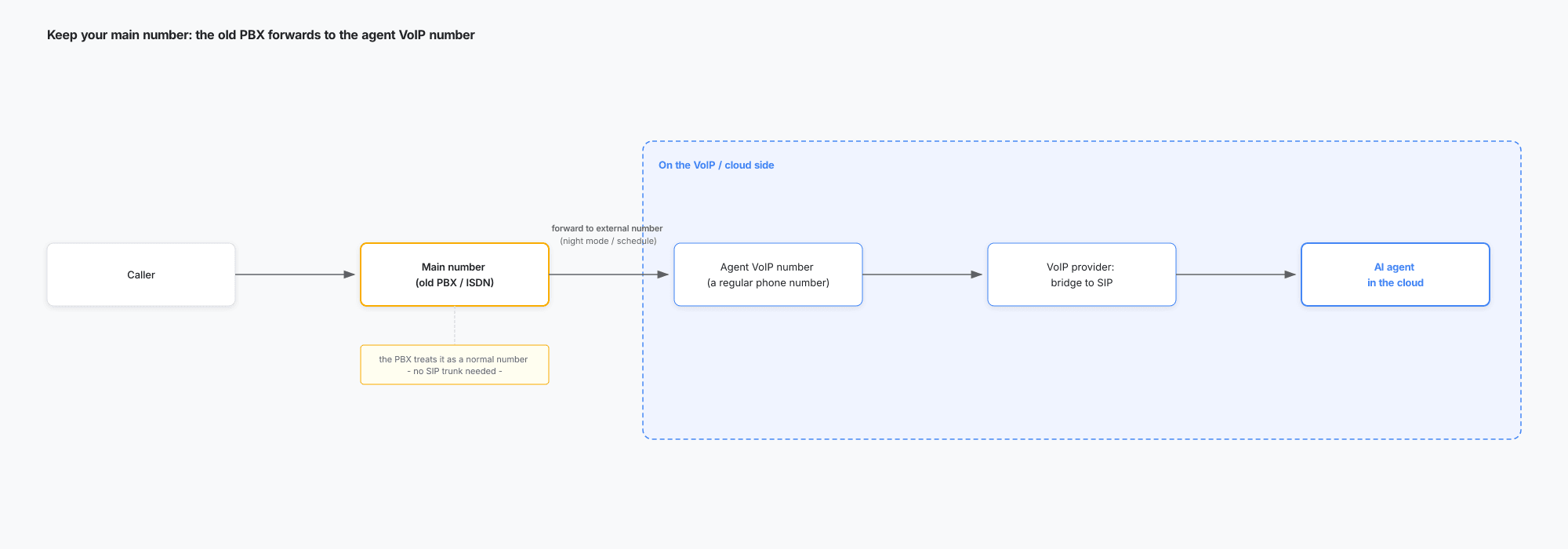
Come viaggia la chiamata:
- Il chiamante compone il tuo numero principale (invariato).
- Il centralino inoltra la chiamata al numero VoIP dell'agente (un normale numero di telefono) - subito o secondo una pianificazione (modalità notturna).
- L'operatore VoIP che ospita quel numero indirizza la chiamata all'URI SIP dell'agente.
- L'agente AI risponde.
Ci sono tre modi per farlo (scegline uno):
A. Nuovo numero VoIP + inoltro del centralino verso di esso (consigliato).
- Acquista un numero virtuale VoIP da un operatore (ad esempio Zadarma).
- Indirizza quel numero verso l'agente (inoltro all'URI SIP, come nell'Opzione 1).
- Sul centralino, inoltra il tuo numero principale verso quel numero VoIP (idealmente secondo una pianificazione / modalità notturna).
Il tuo numero principale e il centralino rimangono invariati. Condizioni: il centralino deve essere in grado di inoltrare a un numero esterno (urbano); una chiamata inoltrata occupa un canale e può essere tariffata come chiamata in uscita (minuti di conversazione a carico del proprietario del centralino).
B. Trasferisci il tuo numero principale a un operatore VoIP (portabilità).
Sposti il numero principale verso un operatore VoIP, facendolo diventare un numero VoIP/SIP. Un centralino ISDN non può accettare direttamente il SIP, ma un gateway compatibile può mantenerlo collegato; la sostituzione del centralino non è sempre necessaria. Fai verificare la compatibilità al tuo installatore prima di avviare la portabilità. Consulta la spiegazione di Patton sul collegamento dei vecchi centralini ai trunk SIP. Dopo il passaggio, imposta l'inoltro nel pannello dell'operatore (come nell'Opzione 1). Scegli questa opzione solo se intendi comunque modernizzare l'impianto telefonico.
C. Gateway da ISDN a VoIP.
Un dispositivo che fa da ponte tra il mondo ISDN (il tuo centralino) e il mondo VoIP/SIP. In questo caso converte il traffico in uscita del centralino da ISDN a SIP verso l'agente (direzione da ISDN a VoIP), permettendo al centralino di inviare le chiamate all'agente senza un numero VoIP intermedio. Richiede l'acquisto di hardware e la configurazione (supporto IT/telecomunicazioni) - un'opzione per casi avanzati in cui A e B non sono adatti.
Opzione 3 - vuoi un numero nuovo e separato per l'agente
- Acquista un nuovo numero VoIP da un operatore (ad esempio Zadarma).
- Indirizzalo verso l'agente (inoltro all'URI SIP, come nell'Opzione 1).
Pubblica quel numero come linea AI dedicata (ad esempio una linea di assistenza attiva 24/7). La tua telefonia esistente e il tuo numero principale rimangono intatti. Questo è il metodo più rapido per iniziare ed è ottimo per una fase pilota. Il compromesso: l'agente gestirà solo le persone che chiamano specificamente quel numero.
Opzionale: instradare all'IA solo alcune chiamate
Se l'assistente deve rispondere solo in determinate fasce orarie (ad esempio fuori dall'orario di lavoro), usa una regola oraria sul lato telefonia - all'interno dell'elemento che gestisce il traffico:
- se il numero è già VoIP, nel pannello del provider VoIP (ad esempio una pianificazione degli inoltri in Zadarma);
- se un vecchio PBX inoltra il tuo numero principale (Opzione 2), nella pianificazione del PBX / modalità notturna.
È la telefonia a stabilire quando una chiamata va all'IA e quando va alla tua destinazione abituale - l'assistente non trasferisce chiamate tra numeri diversi.
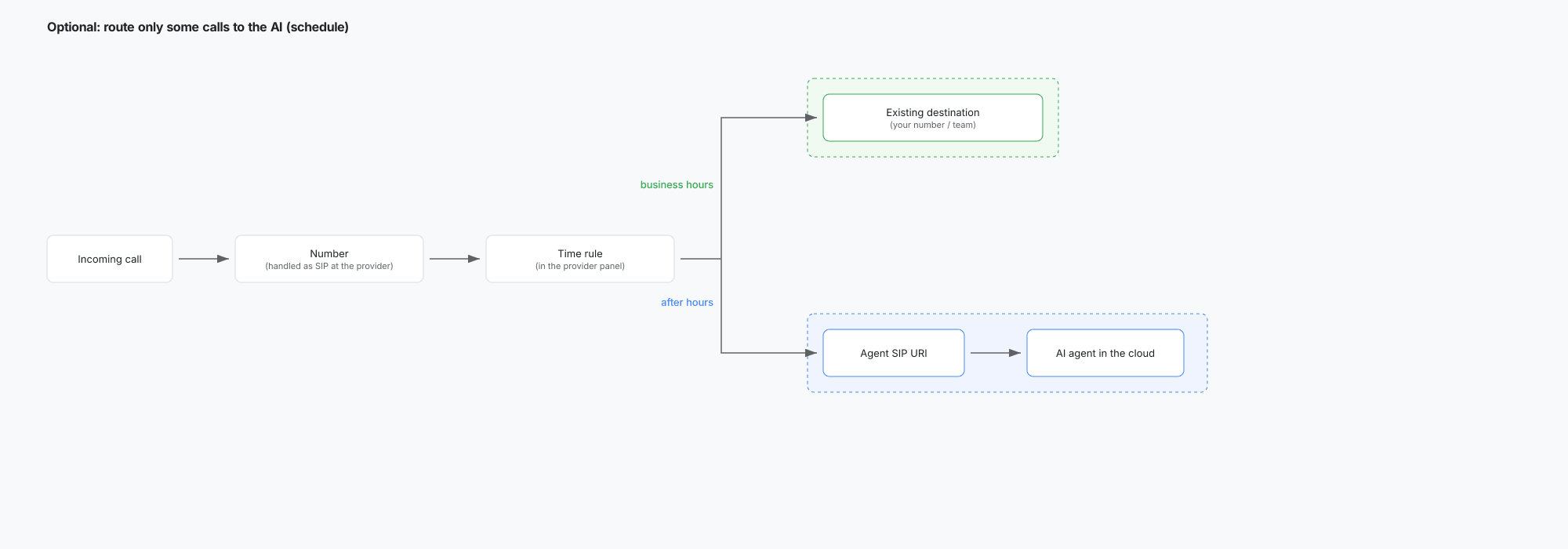
Nella regola definisci entrambe le direzioni:
- orario lavorativo - inoltro al tuo numero attuale / team;
- fuori orario - inoltro al SIP URI dell'assistente.
Più chiamate simultanee
- Prima di farvi affidamento, conferma la capacità di chiamate simultanee con il tuo provider e con ChatLab. Il limite predefinito di sessioni del widget non garantisce un limite per le chiamate in entrata.
- Ogni chiamata consuma crediti voce in modo indipendente; controlla i tuoi slot telefonici disponibili e la tariffa voce visualizzata.
- Il numero di canali simultanei potrebbe tuttavia essere limitato o tariffato dal tuo provider della linea telefonica, a seconda del relativo piano (ad esempio, un pacchetto di canali SIP trunk).
Cosa non fa l'agente
- L'agente gestisce l'intera conversazione in autonomia e non trasferisce una chiamata in corso a un altro numero o a una persona. Per un ricontatto da parte di un operatore, configura le istruzioni dell'agente in modo che richieda i dettagli per richiamare, quindi consulta la trascrizione nei registri chat (Chatlogs) al termine della chiamata.
- La scelta di quali chiamate inoltrare all'AI (ad esempio in base a un orario) viene gestita dal tuo sistema telefonico, non dall'agente.
Glossario
- VoIP - telefonia via Internet.
- SIP - il protocollo che stabilisce le chiamate VoIP.
- SIP URI - l'indirizzo dell'assistente nel mondo SIP, ad esempio
number@sip.rtc.elevenlabs.io. Funziona come un "indirizzo Internet" per una linea telefonica. - SIP trunk - un collegamento SIP utilizzato da un provider per inviare/ricevere chiamate tramite SIP anziché tramite linea tradizionale; può gestire più canali (chiamate) contemporaneamente.
- ISDN - precedente tecnologia telefonica digitale su rete fissa (linee urbane precedenti all'era VoIP).
- PBX - il dispositivo o servizio che smista le chiamate all'interno di un'azienda (interni, inoltro, modalità notturna).
- Provider VoIP - un'azienda che fornisce numeri e servizi telefonici tramite SIP (ad esempio Zadarma, Twilio, Telnyx).
- Numero VoIP virtuale - un numero di telefono ospitato presso un provider VoIP senza linea fisica; può essere inoltrato ovunque, compreso un SIP URI.
- Portabilità - il trasferimento di un numero a un provider diverso mantenendo il numero stesso.
- Gateway da ISDN a VoIP - un dispositivo che converte le chiamate tra il mondo ISDN e il mondo VoIP/SIP.
Verifica l'instradamento
Chiama il numero pubblicato da un altro telefono, verifica che l'AI risponda e che entrambe le parti si sentano reciprocamente, quindi termina la chiamata e controlla Chatlogs (registri delle chat). Se utilizzi una regola per l'orario di chiusura, testa sia la finestra attiva sia quella inattiva. Una regola di inoltro configurata non è una prova del corretto funzionamento dell'instradamento end-to-end.