Phone Calls lets you assign a real phone number to your ChatLab chatbot so customers can call in over the regular phone network. The bot picks up automatically and talks to the caller through its voice agent. You bring your own phone number from a provider that supports compatible forwarding to an external SIP URI - ChatLab provides the slot and the voice agent. Phone calls are currently available for the ElevenLabs Voice model.
Where to find phone settings
Open your bot, click the Settings tab and select Voice Conversation in the left sidebar. Make sure voice conversation is enabled, then switch the Voice Model to ElevenLabs Voice. Scroll to the bottom of the page to find the Phone Number (SIP Trunk) panel.
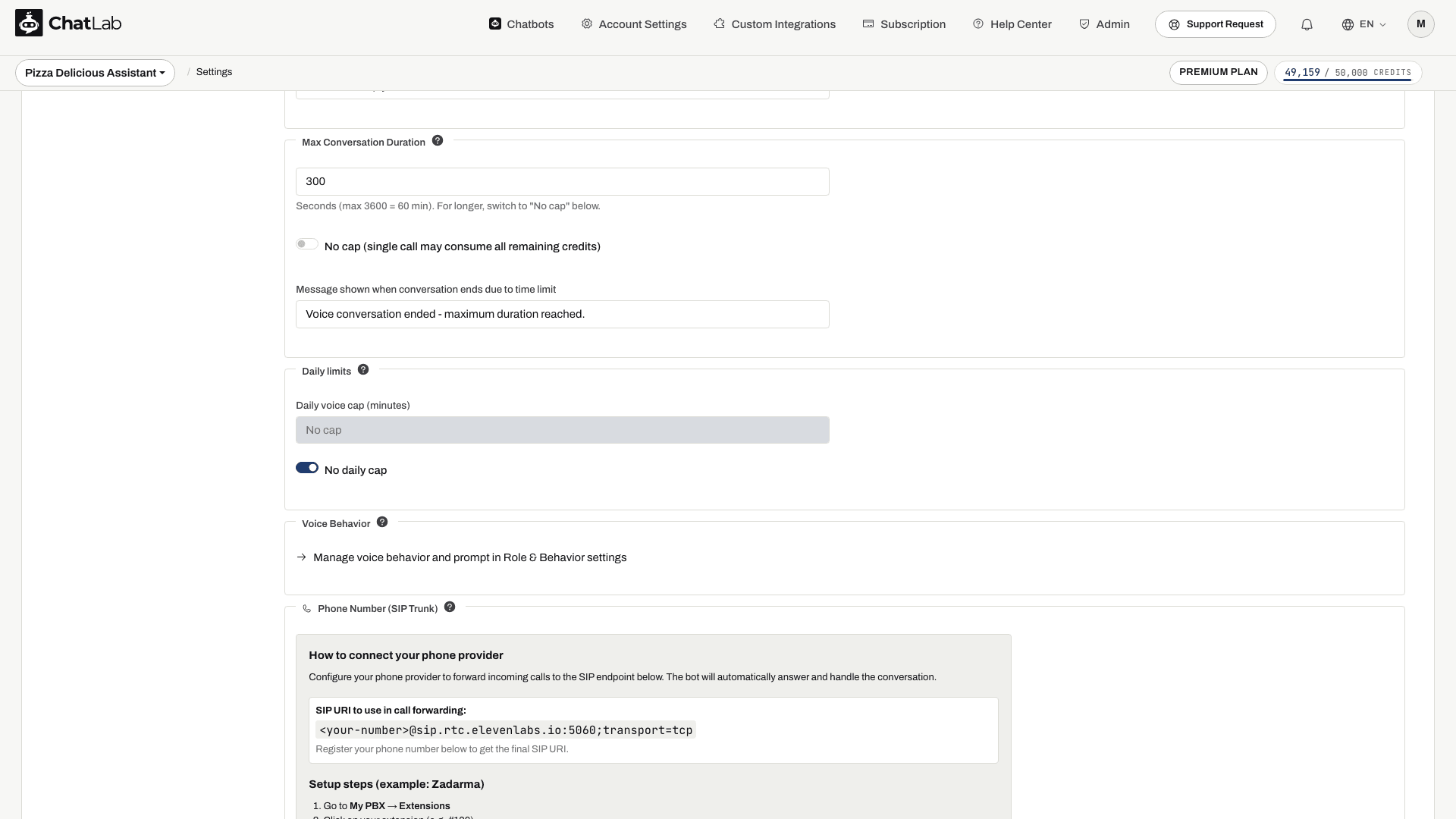
How to configure a phone provider
You need Voice Conversation enabled, enough message credits and an available Voice Phone Slot. If the panel shows No phone slots available, follow its subscription link to review available add-ons.
- Wait for Saved after choosing ElevenLabs Voice.
- Register your number as described below, then copy the final SIP URI containing that number. Do not paste the
<your-number>placeholder into your provider's configuration. - Configure inbound forwarding to that URI in your provider's panel.
- Place a test call, verify two-way audio and end the call. Check Chatlogs after the provider has delivered the completed call record.
Setup steps for Zadarma
The panel walks you through Zadarma end-to-end:
- Go to My PBX > Extensions.
- Click your extension (for example #100).
- Enable Call forwarding and voicemail.
- Set the condition to Always active.
- Set Call forwarding to to External server (SIP URI).
- Paste the SIP URI shown in the panel.
- Click Save.
For other providers
Use these values when configuring SIP forwarding on any other provider:
- SIP Server / Host:
sip.rtc.elevenlabs.io - Port: 5060 (TCP) or 5061 (TLS)
- Transport: TCP with port 5060; use TLS with port 5061 if supported by your provider
- Media encryption: Disabled
- Authentication: None (leave blank)
Register the phone number
Enter your phone number in international format (for example +48123456789) and click Register phone number. Wait for Registered number, then configure forwarding and place a test call. Registration alone does not change your carrier's routing.
After registration
Once a number is registered, a few things change in the panel:
- The SIP URI now embeds the actual phone number, for example
+48123456789@sip.rtc.elevenlabs.io:5060;transport=tcp. A Registered number label appears at the top of the panel. - The phone number input is replaced with an Unregister phone number button so you can release the slot at any time.
- A new Phone Security section opens below the panel with optional restrictions.
Phone Security
Phone Security lets you tighten how the bot accepts inbound calls. All fields are optional - leaving everything blank means the bot accepts every call coming in through the SIP provider. Changes save automatically.
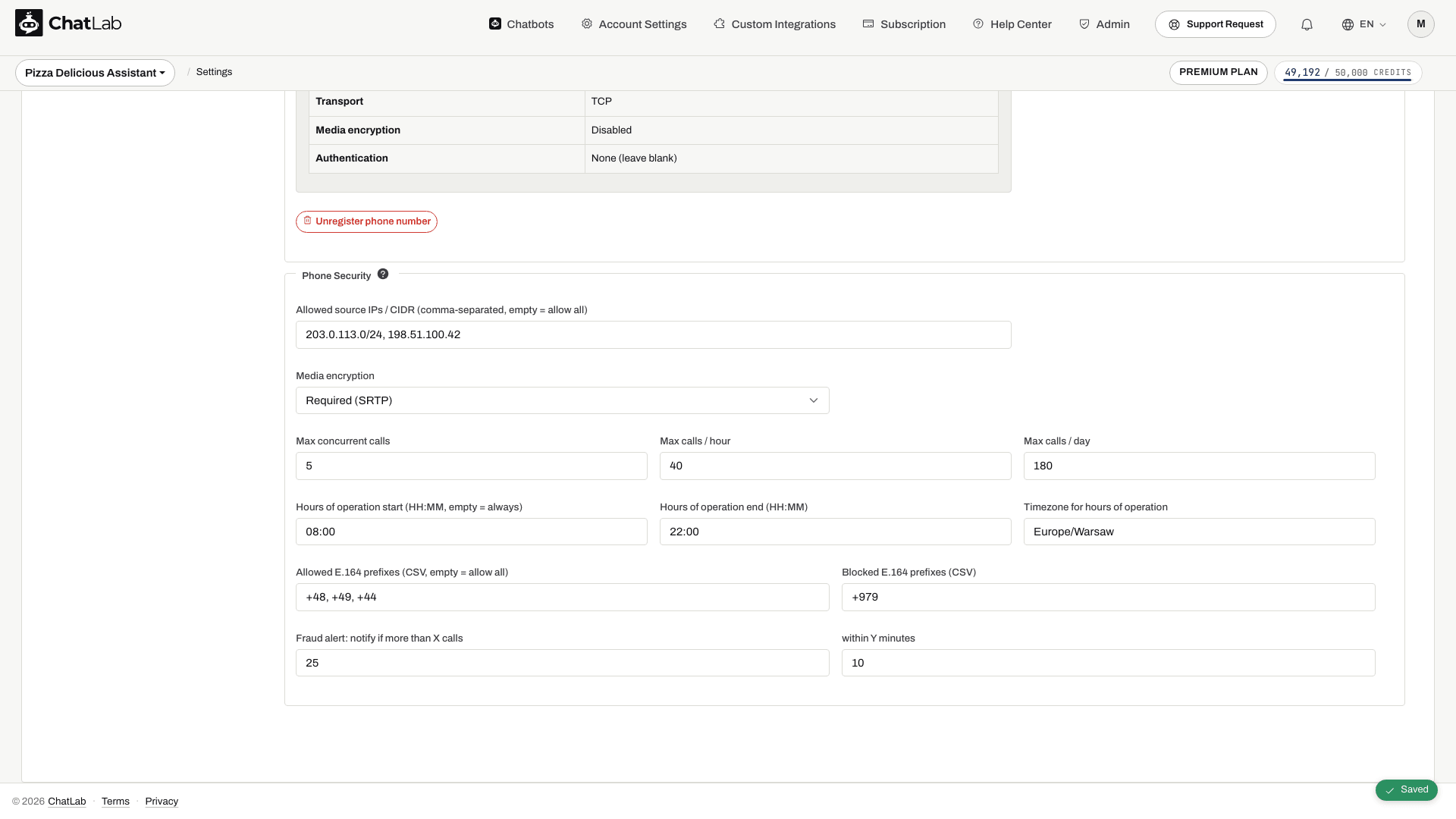
- Allowed source IPs / CIDR - comma-separated list. Restrict SIP traffic to specific IPs, for example your provider's outbound SIP IP range.
- Media encryption - Disabled (default) or Required (SRTP) if your provider supports it.
The panel also shows Max concurrent calls, Max calls / hour, Max calls / day, Hours of operation start / end, Timezone for hours of operation, allowed and blocked E.164 prefixes, and fraud-alert thresholds. These fields should not be treated as confirmed enforcement controls. Set essential schedules, caller restrictions and traffic limits with your phone provider and verify the result with test calls. If entering operating hours here, provide both times and a valid timezone, such as Europe/Warsaw, or leave all three empty.
The voice agent receives the per-call duration setting. Do not assume the widget daily cap or its pre-call credit check also blocks incoming SIP calls.
How phone-call billing works
Phone calls use the duration reported by ElevenLabs after the call:
- The first minute is the minimum voice charge; check the current rate in Settings > Voice Conversation.
- Longer calls are calculated from the reported duration and rounded up to whole credits.
- Silence while connected is part of call duration.
- ElevenLabs voice charges are additional to the bot's text-model replies. Carrier number rental and forwarding charges are separate.
For the supported transport and routing requirements, see ElevenLabs SIP trunking documentation. Zadarma describes external routing in Connect a number to your server.