Bot Talk API
La Bot Talk API es una API REST para comunicarte con un chatbot específico desde tu propia aplicación - aplicaciones personalizadas, herramientas internas o automatizaciones que construyas tú mismo. Creas una clave de API en la pestaña API del bot y luego llamas al endpoint de chat utilizando la clave como token Bearer para obtener las respuestas del bot, ya sea en una respuesta única o transmitidas mediante streaming a través de SSE.
Primeros pasos
- Selecciona tu chatbot y ve a la pestaña API en la parte superior de la página del bot (Select Bot > API [Seleccionar bot > API]).
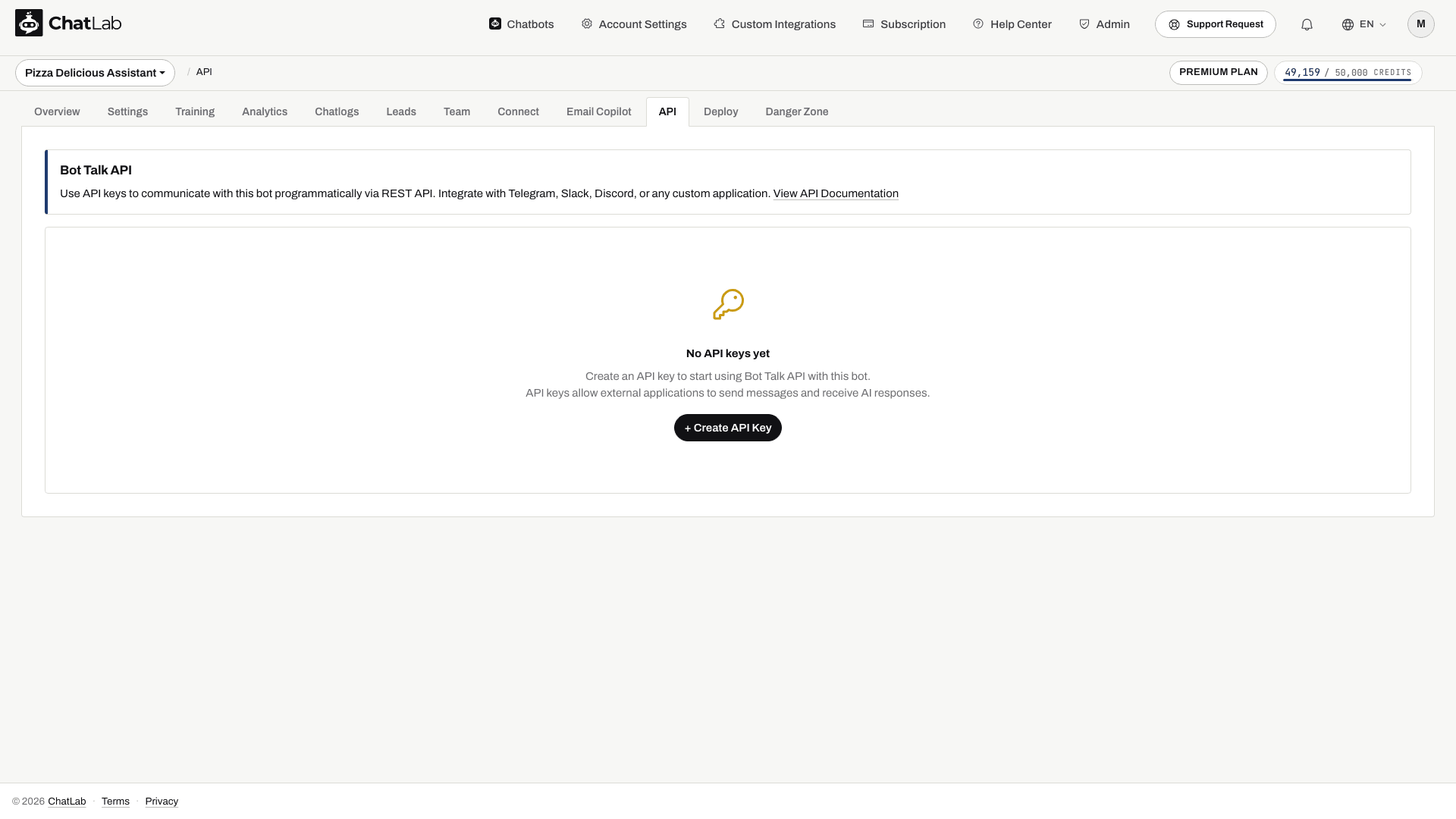
- Haz clic en Create API Key [Crear clave de API].
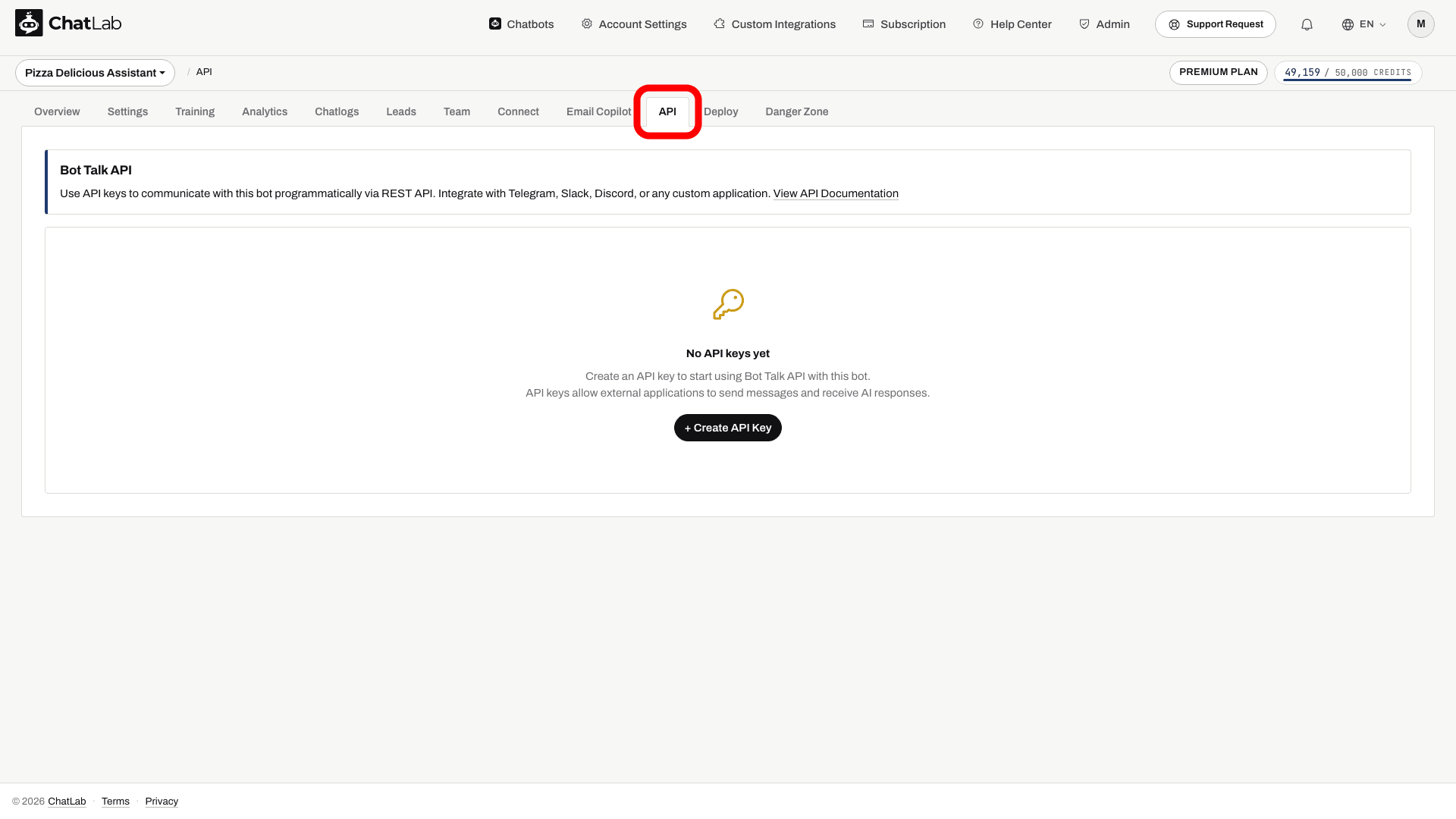
El contador junto al botón muestra cuántas claves están activas ("1 of 5 API keys active" [1 de 5 claves de API activas]). El enlace View API Documentation [Ver documentación de la API] abre esta referencia, y el fragmento de curl de Quick Start [Inicio rápido] te ofrece un ejemplo listo para ejecutar.
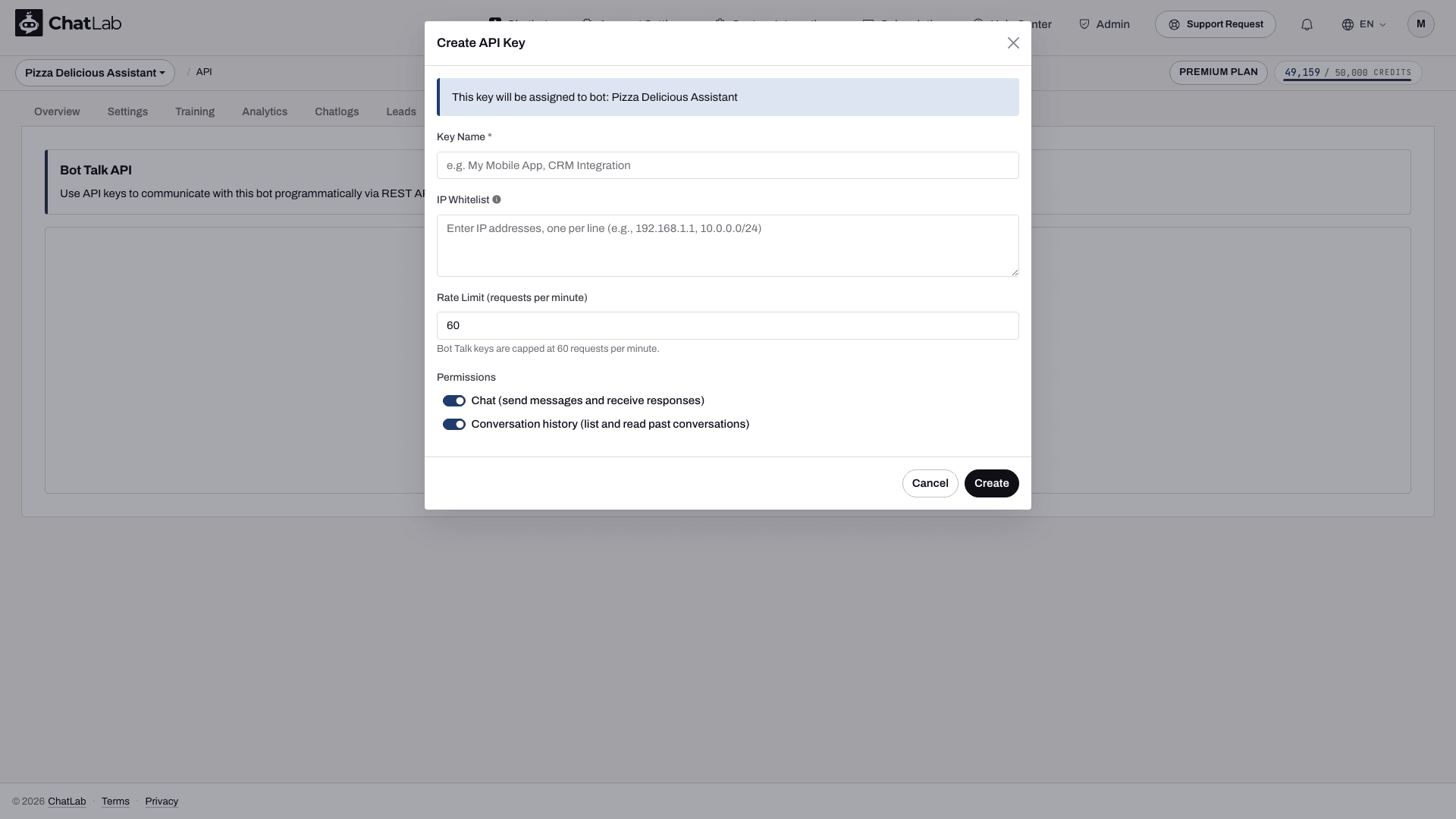
- En el cuadro de diálogo Create API Key [Crear clave de API], asigna un nombre a la clave, define opcionalmente una lista blanca de IP y un límite de frecuencia (rate limit), elige los permisos que tendrá y haz clic en Create [Crear].
- Copia la clave completa desde el cuadro de diálogo de confirmación. El texto sin formato se muestra solo una vez.
Una clave tiene el formato ck_abcdefghijklmnopqrstuvwxyz012345. Cada clave pertenece a ese bot en particular, por lo que cada solicitud realizada con la clave se comunica con ese bot; el bot queda identificado mediante la clave y nunca aparece en la URL.
- Desde tu servidor, ejecuta el ejemplo de curl que aparece a continuación con tu clave y un mensaje de prueba corto. Guarda el
conversationIddevuelto y luego reutilízalo para un mensaje de seguimiento. Confirma la respuesta y la conversación en la pestaña Chatlogs [Registros de chat] del bot.
Mantén las claves ck_ en tu servidor, no en el JavaScript de tu sitio web ni en paquetes de aplicaciones móviles. Un permiso de Conversations otorga acceso a las conversaciones guardadas de este bot entre todos los visitantes, por lo que tu aplicación debe autorizar a cada usuario final antes de devolver esos datos. Usa Revoke [Revocar] o Delete [Eliminar] en la pestaña API para retirar una clave; ninguna de las dos acciones volverá a mostrar su texto sin formato.
Antes de comenzar, crea y entrena tu chatbot y comprueba que tu cuenta incluya acceso a la API y tenga créditos de mensajes.
URL base
https://api.chatlab.com/aichat
Todos los endpoints de este artículo son relativos a esta URL base.
Permisos de la clave
Cada clave cuenta con uno o ambos permisos, configurados mediante los interruptores en el cuadro de diálogo Create API Key:
- Chat (send messages and receive responses) [Chat (enviar mensajes y recibir respuestas)] - permite el acceso a los endpoints
/v1/chaty/v1/chat/stream. - Conversation history (list and read past conversations) [Historial de conversaciones (listar y leer conversaciones pasadas)] - permite el acceso a los endpoints
/v1/conversations.
La pestaña API muestra los permisos otorgados a cada clave como insignias de Chat y Conversations (Conversaciones).
Autenticación
Envía la clave en el encabezado Authorization en cada petición:
Authorization: Bearer ck_abcdefghijklmnopqrstuvwxyz012345
Las peticiones sin un encabezado Authorization: Bearer ... devuelven 401 missing_api_key. Las claves desconocidas devuelven 401 invalid_api_key; las claves revocadas devuelven 401 revoked_api_key. Cinco intentos no válidos en un minuto desde la misma IP activan un bloqueo de 60 minutos.
Límites
- Máximo 5 claves de Bot Talk activas por bot
- Máximo 60 peticiones por minuto por clave (token bucket, capacidad de 60, reposición uniforme a 1 token por segundo). Configurable hacia abajo en el momento de la creación: define un valor inferior en
rateLimitPerMinutey el límite se reducirá, adaptándose también la tasa de reposición. - Longitud máxima del mensaje: 4.000 caracteres
- Los flujos SSE concurrentes por clave están sujetos a los límites de tu cuenta
Endpoints
POST /v1/chat
Envía un mensaje al bot y recibe la respuesta completa en una única respuesta JSON.
Cuerpo de la solicitud
{
  "message": "Hi, can you help me track my order?",
  "conversationId": "550e8400-e29b-41d4-a716-446655440000",
  "metadata": {"userEmail": "alice@example.com"}
}
message- cadena obligatoria, máximo 4000 caracteres.conversationId- UUID opcional. Omítelo para iniciar una nueva conversación; reutiliza el valor devuelto previamente por el servidor para continuar una existente.metadata- objeto opcional que acepta{source, userName, userEmail, userPhone}. Actualmente aquí solo se usauserEmailpara obtener el identificador de cliente; el canal se registra como API. No des por hecho que el resto de campos de metadatos se guardarán en un registro de lead.
Cuerpo de la respuesta (200)
{
  "message": {"role": "assistant", "content": "Sure, what's your order number?"},
  "conversationId": "550e8400-e29b-41d4-a716-446655440000",
  "model": "5.6-LUNA",
  "usage": {"creditsUsed": 2},
  "actions": []
}
message.rolesiempre es"assistant";message.contentes la respuesta completa.modeles el ID del modelo con el que se ejecutó el bot en esta llamada.usage.creditsUsedreporta actualmente 2 más uno por cada llamada a herramienta reportada en un turno completado. Este contador incluido en la respuesta no incluye multiplicadores de créditos por modelo o contexto y no debe utilizarse como registro de facturación. Usa los datos de consumo de Management API para consultar el consumo de la cuenta y revisa los créditos de mensajes.actionslista las ejecuciones de herramientas que se ejecutaron durante este turno. Actualmente solo se emiten entradas de tipofunction_call(contype,name,status: "completed").
POST /v1/chat/stream
Variante con streaming de /v1/chat. Devuelve Content-Type: text/event-stream mediante Server-Sent Events.
Cuerpo de la solicitud
Misma estructura que POST /v1/chat. El flag stream en el cuerpo no es obligatorio: usar esta ruta es lo que activa SSE.
Cuerpo de la respuesta (eventos SSE)
message.reset- descarta el texto acumulado para la respuesta actual y vuelve a recopilar deltas. Esto puede ocurrir si la generación se reinicia; concatenar ambas versiones mostraría una respuesta duplicada o desactualizada.message.delta- fragmento de contenido{ "content": "..." }. Se transmiten varios de estos a medida que llegan los tokens.action- ejecución de herramienta{ "type", "name", "status": "executing" }. Se emite cuando el bot activa una llamada a una función.message.done- evento final conconversationId,model,usagey (si la hubiera) la lista completa deactions.error- se envía si la generación falla; la transmisión termina a continuación.
Se envían comentarios SSE de mantenimiento de conexión (keep-alive: :keepalive) cada 15 segundos durante generaciones prolongadas. Tiempos de espera en el servidor: 30 segundos para el primer token, 120 segundos en total por stream.
Ejemplo con curl
curl -N -X POST https://api.chatlab.com/aichat/v1/chat/stream \
  -H "Authorization: Bearer ck_..." \
  -H "Content-Type: application/json" \
  -d '{"message":"hello"}'
GET /v1/conversations
Lista las conversaciones del bot asociado a tu clave, en todas las fuentes (widget, WhatsApp, API, etc.).
Parámetros de consulta
limit- 1-100, valor por defecto 20. Los valores fuera de este rango se ajustan a los límites.cursor- valor opaco devuelto ennextCursoren la página anterior. Omítelo para la primera página.
Cuerpo de la respuesta (200)
{
  "data": [
    {
      "conversationId": "550e8400-e29b-41d4-a716-446655440000",
      "createdAt": "2026-05-10T14:11:02Z",
      "lastMessageAt": "2026-05-10T14:12:34Z",
      "messageCount": 6,
      "lastMessagePreview": "Thanks for the help."
    }
  ],
  "hasMore": false,
  "nextCursor": null
}
lastMessagePreviewse trunca a 100 caracteres con un sufijo....nextCursoresnullen la última página; pásalo comocursorpara obtener la siguiente.
GET /v1/conversations/{conversation_id}
Mensajes de conversación conservados que expone este endpoint.
Cuerpo de la respuesta (200)
{
  "conversationId": "550e8400-e29b-41d4-a716-446655440000",
  "createdAt": "2026-05-10T14:11:02Z",
  "lastMessageAt": "2026-05-10T14:12:34Z",
  "messageCount": 6,
  "messages": [
    {"role": "user", "content": "Hi", "createdAt": "2026-05-10T14:11:02Z"},
    {"role": "assistant", "content": "Hello! How can I help?", "createdAt": "2026-05-10T14:11:03Z"}
  ]
}
Solo se devuelven los roles user y assistant; los mensajes internos de system y de herramientas se filtran. Devuelve 404 not_found_error si la conversación no pertenece al bot asociado a tu clave.
Para consultar la configuración del bot, utiliza el endpoint de la Management API GET /v1/management/bots/{bot_id} con una clave de Management.
Encabezados de rate limit
Las respuestas que alcanzan la fase de rate limit (es decir, tras superar la autenticación y la lista blanca de IP) incluyen:
X-RateLimit-Limit: 60
X-RateLimit-Remaining: 57
X-RateLimit-Reset: 1715430000
X-RateLimit-Limit- el límite por clave aplicado efectivamente a esta llamada (60 por defecto, o el valor configurado enrateLimitPerMinutesi es menor).X-RateLimit-Remaining- tokens restantes en el bucket inmediatamente después de esta llamada.X-RateLimit-Reset- marca de tiempo Unix en segundos en la que el siguiente token estará disponible (no es un restablecimiento completo del bucket; este se rellena continuamente). Cuando el bucket está lleno, coincide con la hora actual.
En las respuestas 429 rate_limit_exceeded, también se incluye Retry-After, expresado en segundos enteros hasta que se libere al menos un token.
Los errores previos a la autenticación (401 missing_api_key, 401 invalid_api_key, 403 ip_blocked) y 403 ip_not_whitelisted no incluyen los encabezados X-RateLimit-*; el limitador solo se consulta tras validar con éxito la autenticación y las comprobaciones de IP.
Formato de error
Todos los errores comparten una única estructura envolvente:
{
  "error": {
    "type": "rate_limit_error",
    "code": "rate_limit_exceeded",
    "message": "Rate limit exceeded. Try again in 12 seconds.",
    "param": null
  }
}
Códigos HTTP habituales:
400 invalid_request_error- entrada con formato incorrecto (invalid_parameter)415 invalid_request_error- tipo de contenido no admitido (unsupported_media_type)401 authentication_error- falta la clave (missing_api_key), clave desconocida (invalid_api_key) o clave revocada (revoked_api_key)402 quota_exceeded_error- créditos de mensajes agotados403 permission_error- IP bloqueada (ip_blocked), IP no incluida en la lista blanca de la clave (ip_not_whitelisted) o el tipo de clave no permite este endpoint (key_type_not_allowed,insufficient_permissions)404 not_found_error- la conversación no pertenece a este bot405 invalid_request_error(method_not_allowed) - verbo HTTP incorrecto en la URL429 rate_limit_error- demasiadas solicitudes (rate_limit_exceeded) o demasiados flujos simultáneos (concurrent_streams_exceeded)500 api_error- error interno
Temas relacionados
Para operaciones a nivel de cuenta (crear bots, actualizar bots, consultar el consumo), consulta la Management API.