Funkcja Phone Calls pozwala przypisać prawdziwy numer telefonu do Twojego chatbota ChatLab, dzięki czemu klienci mogą dzwonić przez standardową sieć telefoniczną. Bot odbiera automatycznie i rozmawia z dzwoniącym za pośrednictwem swojego agenta głosowego. Używasz własnego numeru telefonu od operatora, który obsługuje kompatybilne przekierowanie na zewnętrzny SIP URI - ChatLab zapewnia slot oraz agenta głosowego. Połączenia telefoniczne są obecnie dostępne dla modelu ElevenLabs Voice.
Gdzie znaleźć ustawienia telefonu
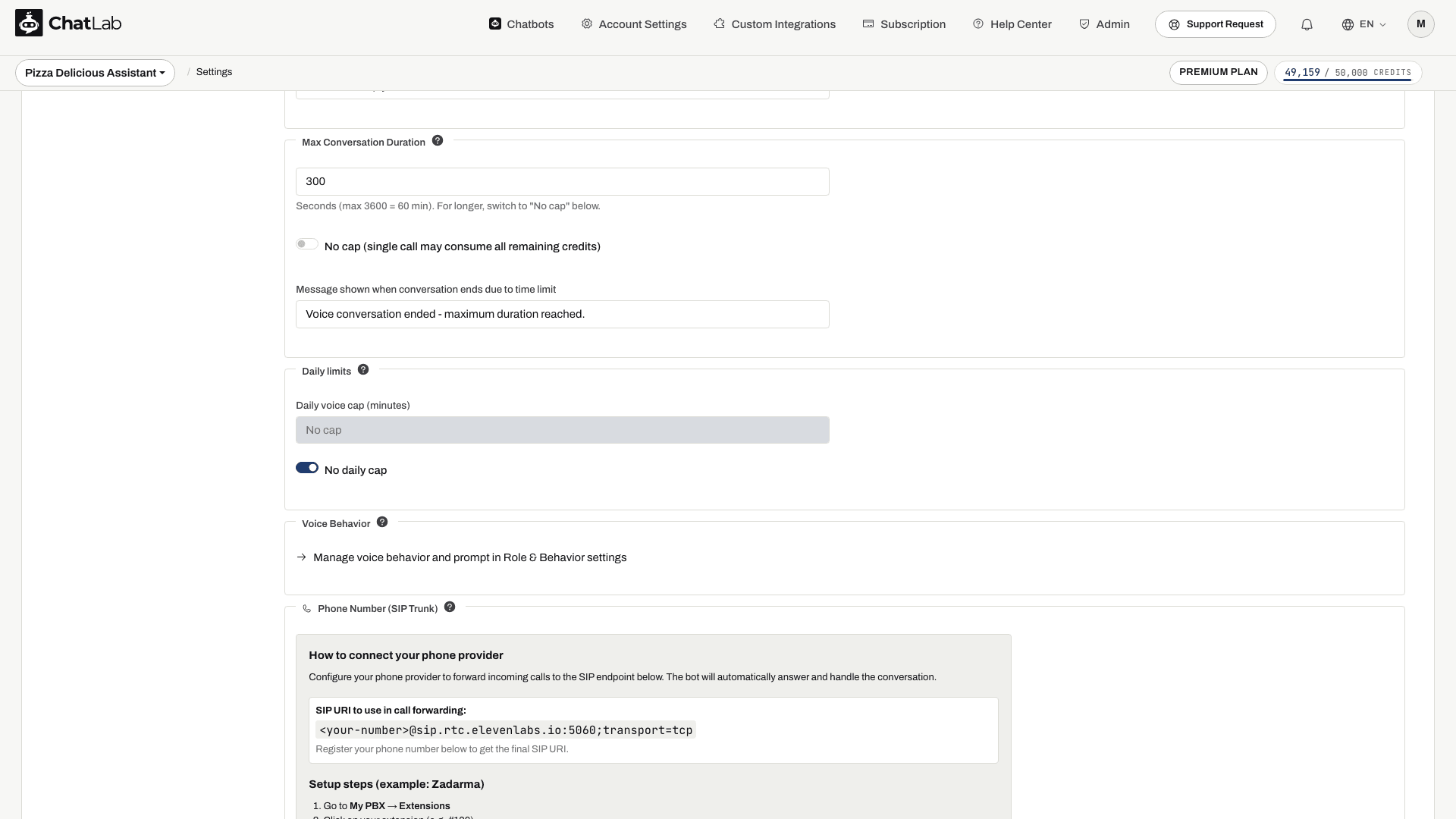
Otwórz swojego bota, kliknij zakładkę Settings (Ustawienia) i wybierz Voice Conversation (Rozmowa głosowa) w lewym pasku bocznym. Upewnij się, że rozmowa głosowa jest włączona, a następnie przełącz opcję Voice Model (Model głosu) na ElevenLabs Voice. Przewiń na sam dół strony, aby znaleźć panel Phone Number (SIP Trunk) (Numer telefonu (SIP Trunk)).
Jak skonfigurować operatora telefonii
Musisz mieć włączoną funkcję Rozmowa głosowa (Voice Conversation), wystarczającą liczbę kredytów na wiadomości oraz dostępny slot telefoniczny Voice Phone Slot. Jeśli w panelu wyświetla się komunikat No phone slots available (Brak dostępnych slotów telefonicznych), przejdź pod podany tam link do subskrypcji, aby przejrzeć dostępne dodatki.
- Po wybraniu modelu ElevenLabs Voice poczekaj na komunikat Saved (Zapisano).
- Zarejestruj swój numer zgodnie z poniższym opisem, a następnie skopiuj gotowy adres SIP URI zawierający ten numer. Nie wklejaj symbolu zastępczego
<your-number>do konfiguracji u swojego operatora. - Skonfiguruj w panelu swojego operatora przekazywanie połączeń przychodzących na ten adres URI.
- Wykonaj połączenie testowe, sprawdź dwukierunkowy dźwięk i zakończ rozmowę. Sprawdź historię rozmów w sekcji Chatlogs, gdy operator przekaże już pełny zapis zrealizowanego połączenia.
Krok po kroku dla Zadarma
Panel przeprowadzi Cię przez konfigurację Zadarma od początku do końca:
- Przejdź do My PBX > Extensions.
- Kliknij swój numer wewnętrzny (na przykład #100).
- Włącz opcję Call forwarding and voicemail.
- Ustaw warunek na Always active.
- W polu Call forwarding to wybierz External server (SIP URI).
- Wklej SIP URI wyświetlony w panelu.
- Kliknij Save.
W przypadku innych dostawców
Użyj tych wartości podczas konfigurowania przekierowania SIP u dowolnego innego dostawcy:
- SIP Server / Host:
sip.rtc.elevenlabs.io - Port: 5060 (TCP) lub 5061 (TLS)
- Transport: TCP z portem 5060; użyj TLS z portem 5061, jeśli jest obsługiwany przez Twojego dostawcę
- Media encryption: Disabled (wyłączone)
- Authentication: Brak (pozostaw puste)
Zarejestruj numer telefonu
Wprowadź swój numer telefonu w formacie międzynarodowym (na przykład +48123456789) i kliknij Register phone number (Zarejestruj numer telefonu). Poczekaj na status Registered number (Zarejestrowany numer), a następnie skonfiguruj przekierowanie i wykonaj połączenie testowe. Sama rejestracja nie zmienia przekierowania u Twojego operatora.
Po rejestracji
Gdy numer zostanie zarejestrowany, w panelu zajdzie kilka zmian:
- Adres SIP URI zawiera teraz właściwy numer telefonu, na przykład
+48123456789@sip.rtc.elevenlabs.io:5060;transport=tcp. W górnej części panelu pojawi się etykieta Registered number (Zarejestrowany numer). - Pole wprowadzania numeru telefonu zostanie zastąpione przyciskiem Unregister phone number (Wyrejestruj numer telefonu), dzięki czemu możesz w każdej chwili zwolnić ten slot.
- Poniżej panelu otworzy się nowa sekcja Phone Security (Zabezpieczenia telefonu) z opcjonalnymi ograniczeniami.
Phone Security (Zabezpieczenia telefonu)
Sekcja Phone Security pozwala zaostrzyć zasady przyjmowania połączeń przychodzących przez bota. Wszystkie pola są opcjonalne - pozostawienie ich pustych oznacza, że bot akceptuje każde połączenie przychodzące od operatora SIP. Zmiany zapisują się automatycznie.
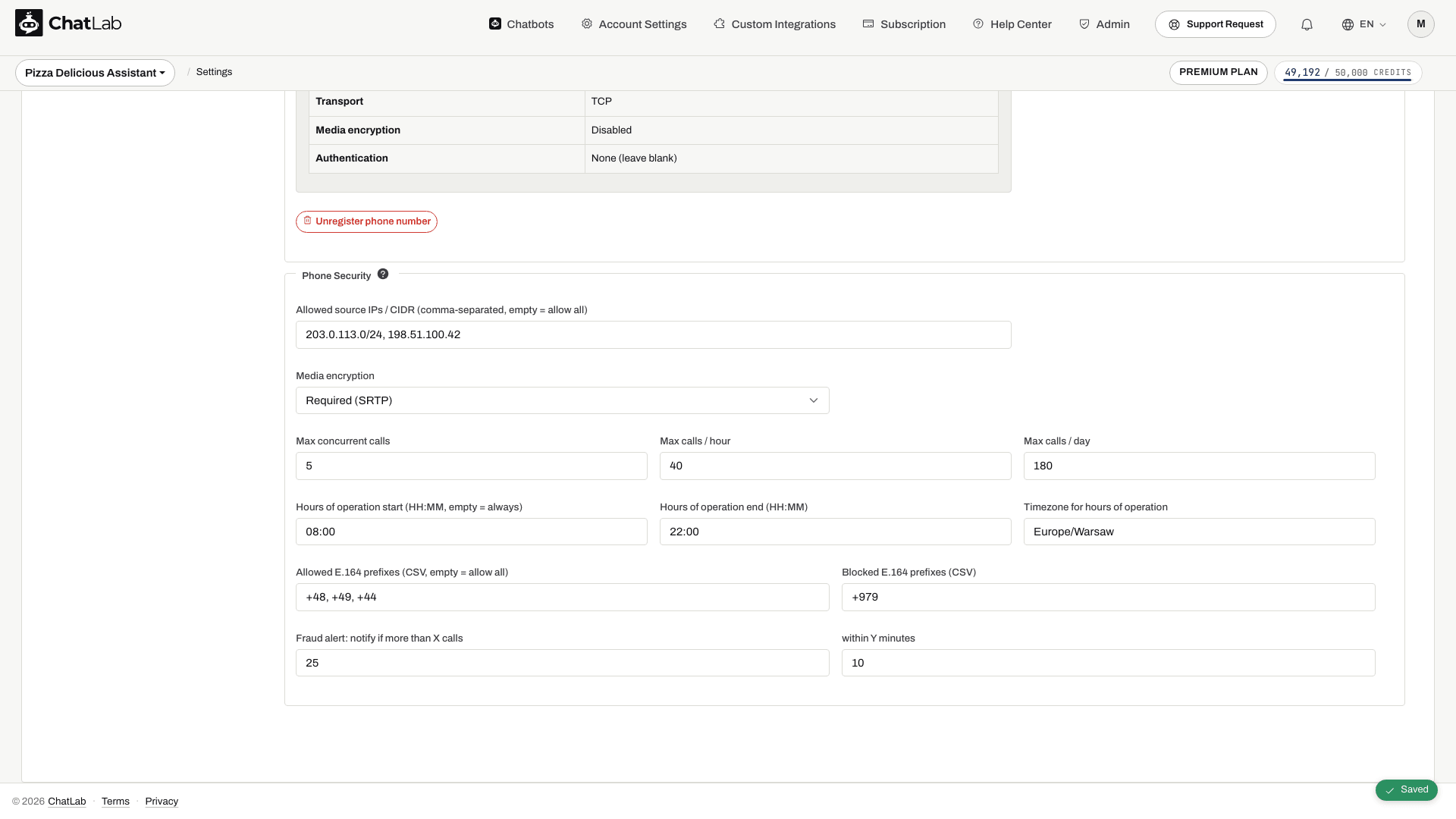
- Allowed source IPs / CIDR (Dozwolone źródłowe adresy IP / CIDR) - lista rozdzielana przecinkami. Ogranicza ruch SIP do określonych adresów IP, na przykład zakresu wychodzących adresów IP SIP Twojego operatora.
- Media encryption (Szyfrowanie mediów) - Disabled (Wyłączone - domyślnie) lub Required (SRTP) (Wymagane (SRTP)), jeśli Twój operator to obsługuje.
W panelu widoczne są również pola Max concurrent calls (Maksymalna liczba jednoczesnych połączeń), Max calls / hour (Maksymalna liczba połączeń na godzinę), Max calls / day (Maksymalna liczba połączeń na dzień), Hours of operation start / end (Godziny pracy: początek / koniec), Timezone for hours of operation (Strefa czasowa godzin pracy), dozwolone i zablokowane prefiksy E.164 oraz progi alertów o nadużyciach. Pól tych nie należy traktować jako gwarantowanych mechanizmów wymuszania ograniczeń. Kluczowe harmonogramy, ograniczenia dotyczące dzwoniących oraz limity ruchu skonfiguruj u swojego operatora telefonicznego i zweryfikuj działanie połączeniami testowymi. Jeśli wprowadzasz tutaj godziny pracy, podaj obie godziny oraz prawidłową strefę czasową, np. Europe/Warsaw, albo pozostaw wszystkie trzy pola puste.
Agent głosowy otrzymuje ustawienie limitu czasu trwania pojedynczego połączenia. Nie zakładaj, że dzienny limit widgetu lub weryfikacja środków przed połączeniem blokują również przychodzące połączenia SIP.
Jak działa rozliczanie połączeń telefonicznych
Połączenia telefoniczne korzystają z czasu trwania zgłoszonego przez ElevenLabs po zakończeniu rozmowy:
- Pierwsza minuta stanowi minimalną opłatę za połączenie głosowe; sprawdź aktualną stawkę w Ustawienia > Rozmowa głosowa (Settings > Voice Conversation).
- Dłuższe połączenia są naliczane na podstawie zgłoszonego czasu trwania i zaokrąglane w górę do pełnych kredytów.
- Cisza podczas aktywnego połączenia jest wliczana do czasu trwania rozmowy.
- Opłaty głosowe ElevenLabs są naliczane niezależnie od odpowiedzi modelu tekstowego bota. Wynajem numeru u operatora oraz koszty przekierowań są rozliczane osobno.
Aby poznać obsługiwane protokoły transmisji i wymagania dotyczące routingu, zobacz dokumentację SIP trunking ElevenLabs. Zadarma opisuje routing zewnętrzny w artykule Podłącz numer do swojego serwera.