Email Copilot operations consume message credits from your monthly quota.
Message credit usage
- Suggest Response -- costs vary by model and context size (e.g., 1 credit for GPT 5-mini at 8K context, 5 credits for GPT 5 at 8K, up to 20 credits for premium models at 32K context)
- Translate incoming email -- 1 credit per translation
- Translate response draft -- 1 credit per translation
- Sending emails -- does not cost message credits
The credit cost tooltip appears when you hover over the question mark icon next to the Suggest Response button.
Limits and quotas
- Maximum emails stored per account: 1,000
- Default email retention: 10 days
- Maximum email retention: 20 days
- Daily send limit: 1--300 (configurable, default 100)
- Maximum recipients per email (To + Cc + Bcc): 20
- Maximum attachment size per email: 10 MB total
- Maximum email body size: 2 MB
- Trash folder capacity: 50 emails
- Email fetch interval: every 30 minutes (automatic)
Email retention and cleanup
Emails are automatically cleaned up based on two rules:
- Age-based cleanup -- emails older than the configured retention period are deleted nightly. Default is 10 days, adjustable from 1 to 20 days
- Count-based cleanup -- if the inbox exceeds 1,000 emails, the oldest are removed regardless of age
Adjusting the retention period
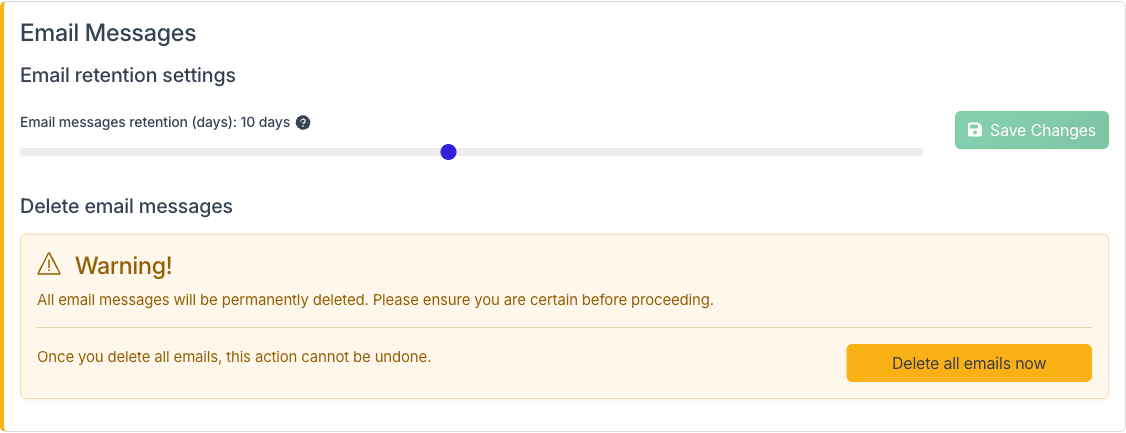
Navigate to Danger Zone and scroll to the Email Messages section. Use the slider to set the retention period between 1 and 20 days, then click Save Changes.
Deleting all emails
In the same section, click Delete all emails now to permanently remove all stored emails. This action cannot be undone.