ChatLab daje Ci kilka sposobów na usunięcie brandingu ChatLab z widgetu czatu i zastąpienie go własnym. Dostępne opcje zależą od Twojej subskrypcji.
Gdzie znaleźć ustawienia whitelabel
Otwórz dowolnego chatbota, przejdź do zakładki Settings (Ustawienia) i wybierz Whitelabel w lewym pasku bocznym.
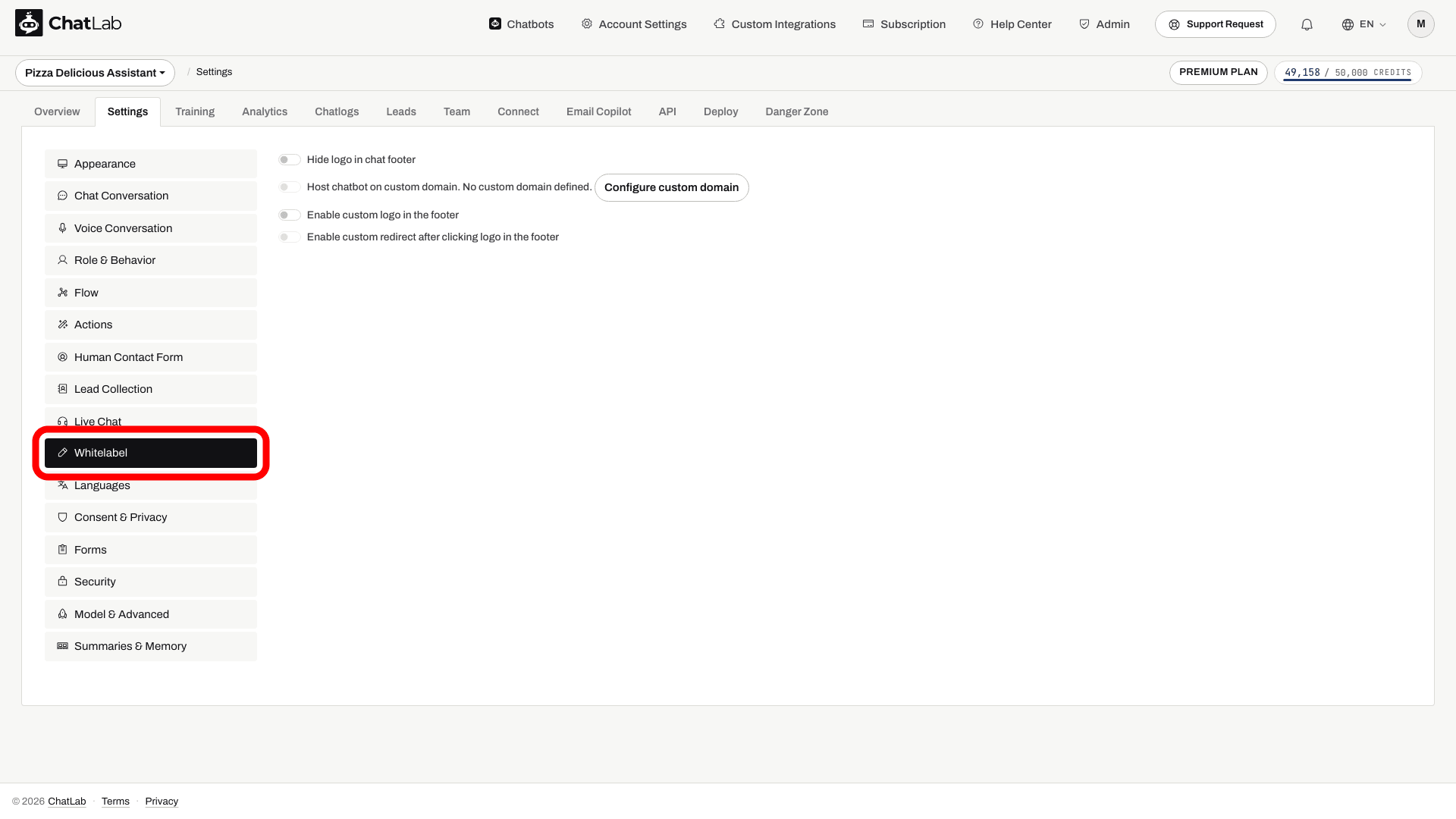
Opcje widoczne w tej zakładce zależą od Twojego poziomu subskrypcji.
Ukryj logo ChatLab w stopce czatu
Włączenie opcji Hide logo in chat footer (Ukryj logo w stopce czatu) usuwa mały podpis „Powered by ChatLab” widoczny na dole widgetu.
Ta opcja jest dostępna jako funkcja premium. Jeśli jest niedostępna, sprawdź zakładkę Subscription (Subskrypcja), aby wybrać odpowiedni plan lub dodatek Remove ChatLab logo (Usuń logo ChatLab). Po przełączeniu opcji poczekaj na wskaźnik zapisu i sprawdź widget widoczny dla odwiedzających.
Utrzymuj chatbota na własnej domenie
Zamiast ładować skrypt widgetu czatu z script.chatlab.com, możesz serwować go z własnej subdomeny (na przykład chat.yourcompany.com). Wywołania z widgetu będą również kierowane przez Twoją subdomenę API.
Wymaga to odpowiedniej funkcji premium na Twoim koncie. Konfiguracja polega na jednorazowej zmianie na poziomie DNS - na Twoich serwerach nie musi działać żadne oprogramowanie.
Aby to skonfigurować:
- Przejdź do Account Settings > Custom Domain (Ustawienia konta > Własna domena) i skonfiguruj swoje subdomeny dla skryptu, API oraz panelu administracyjnego.
- Po zatwierdzeniu domeny otwórz Settings > Whitelabel (Ustawienia > Whitelabel) i włącz opcję Host chatbot on custom domain (Utrzymuj chatbota na własnej domenie).
- Poczekaj na wskaźnik zapisania zmian, skopiuj zaktualizowany kod z sekcji Deploy (Wdróż) i zastąp dotychczasowy fragment kodu na stronie.
- Przetestuj widget na opublikowanej stronie.
Instrukcje krok po kroku znajdziesz w artykule Własne domeny.
Zastąp logo widgetu własnym
Możesz zastąpić małe logo ChatLab w stopce widgetu własnym obrazem (zalecany rozmiar 100x17px) i opcjonalnie ustawić odnośnik do Twojej strony internetowej.
Wymaga to odpowiedniej funkcji premium na Twoim koncie. Aby ją włączyć:
- Otwórz Settings > Whitelabel (Ustawienia > Whitelabel).
- Włącz opcję Enable custom logo in the footer (Włącz własne logo w stopce) i prześlij swój obraz.
- Opcjonalnie włącz opcję Enable custom redirect after clicking logo in the footer (Włącz własne przekierowanie po kliknięciu logo w stopce) i wpisz docelowy URL.
- Poczekaj na wskaźnik zapisu, a następnie sprawdź stopkę i jej link w widgecie widocznym dla odwiedzających.
Uwaga: ta opcja jest wyłączona, gdy aktywna jest funkcja Hide logo in chat footer (Ukryj logo w stopce czatu). Wybierz całkowite ukrycie logo albo zastąpienie go własnym.
Agency Package - pełna platforma White Label
Pakiet Agency Package zapewnia w pełni obrandowaną platformę chatbotową dla agencji, które odsprzedają ChatLab swoim własnym klientom. Łączy w sobie wszystkie powyższe opcje wraz z:
- Własnymi domenami dla skryptu, API oraz aplikacji administracyjnej
- Obrandowanym portalem klienta, w którym Twoi klienci logują się pod Twoją marką
- Twoim logo w widgecie czatu, interfejsie administracyjnym i wiadomościach e-mail
- Niezależnym rozliczaniem klientów - Ty ustalasz własne ceny i zachowujesz cały przychód
Pełne informacje i kroki konfiguracji znajdziesz w artykule Jak działa program agencyjny?.
Powiązane artykuły
- Własne domeny - konfiguracja DNS do hostowania skryptu i API we własnej domenie
- Niestandardowy portal użytkownika - logowanie i rejestracja do panelu administracyjnego pod Twoją marką dla Twoich klientów
- Jak działa program agencyjny? - pełny pakiet odsprzedaży White Label