Message Credits verbraucht Ihr Chatbot jedes Mal, wenn er einem Besucher antwortet - falls das Konzept neu für Sie ist, lesen Sie zuerst Was ist ein Nachrichten-Credit?. Dieser Artikel zeigt Ihnen alle Stellen, an denen Sie überprüfen können, wie viele Credits (und andere Ressourcen Ihres Plans) Sie verbraucht haben und wie viele noch übrig sind.
Kopfzeile (immer sichtbar)
Die Kopfzeile oben auf jeder Seite zeigt Ihr aktuelles Plan-Badge und eine Credits-Anzeige:
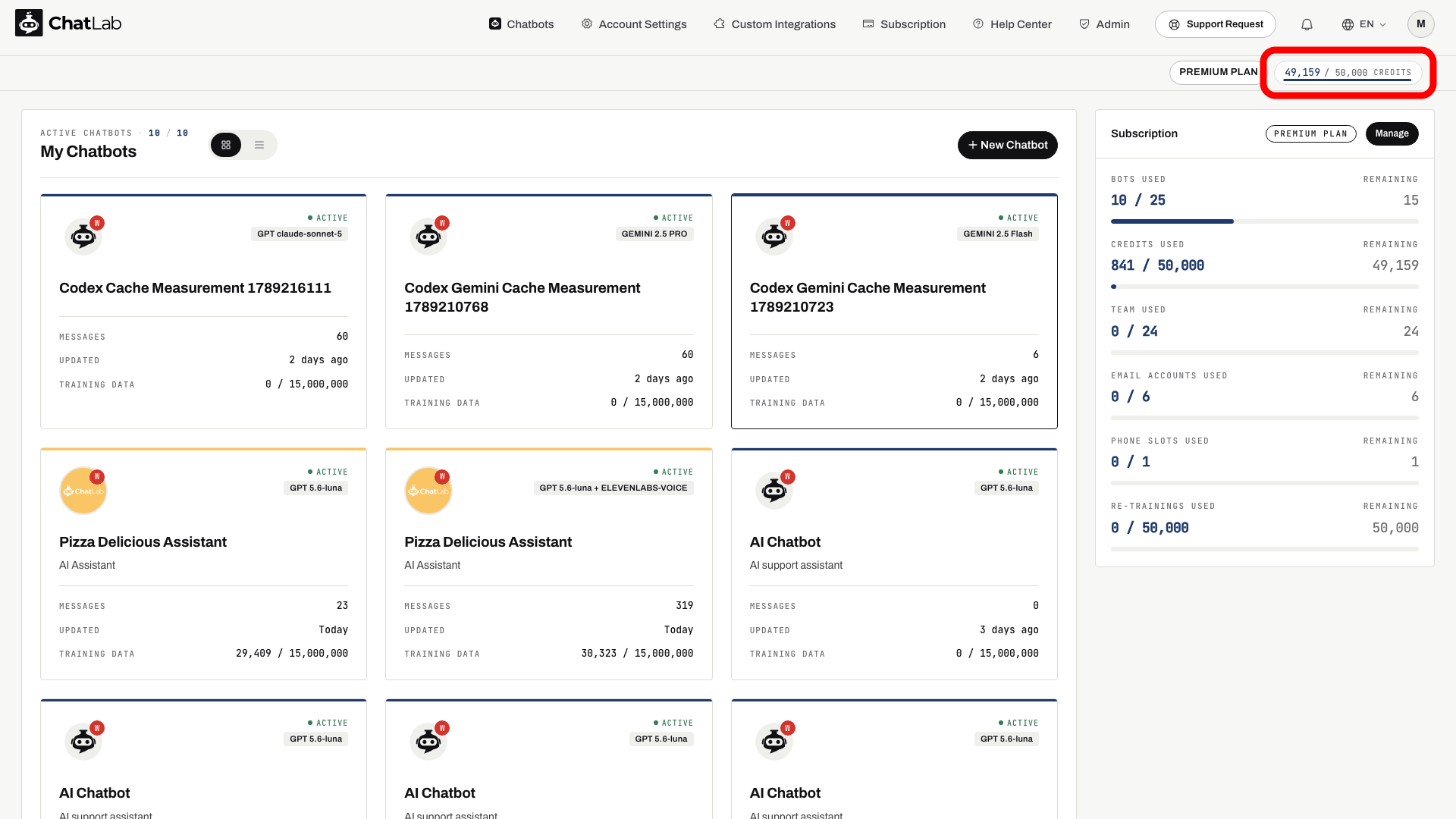
Die Credits-Anzeige zeigt Ihre verbleibenden Credits von Ihrem monatlichen Gesamtkontingent. Der kleine Balken darunter füllt sich entsprechend dem, was Sie noch übrig haben.
Der Zähler aktualisiert sich automatisch, sobald neue Nutzung gemeldet wird - die Seite muss nicht neu geladen werden. Wenn Sie auf das Plan-Badge oder die Credits-Anzeige klicken, gelangen Sie direkt zur Seite Subscription (Abonnement).
Dashboard (Hauptseite „Chatbots“)
Navigieren Sie im Hauptmenü zu Chatbots. Der Bereich Subscription (Abonnement) auf der rechten Seite zeigt Ihre gesamte Nutzung auf Kontoebene in Form von Balken an:
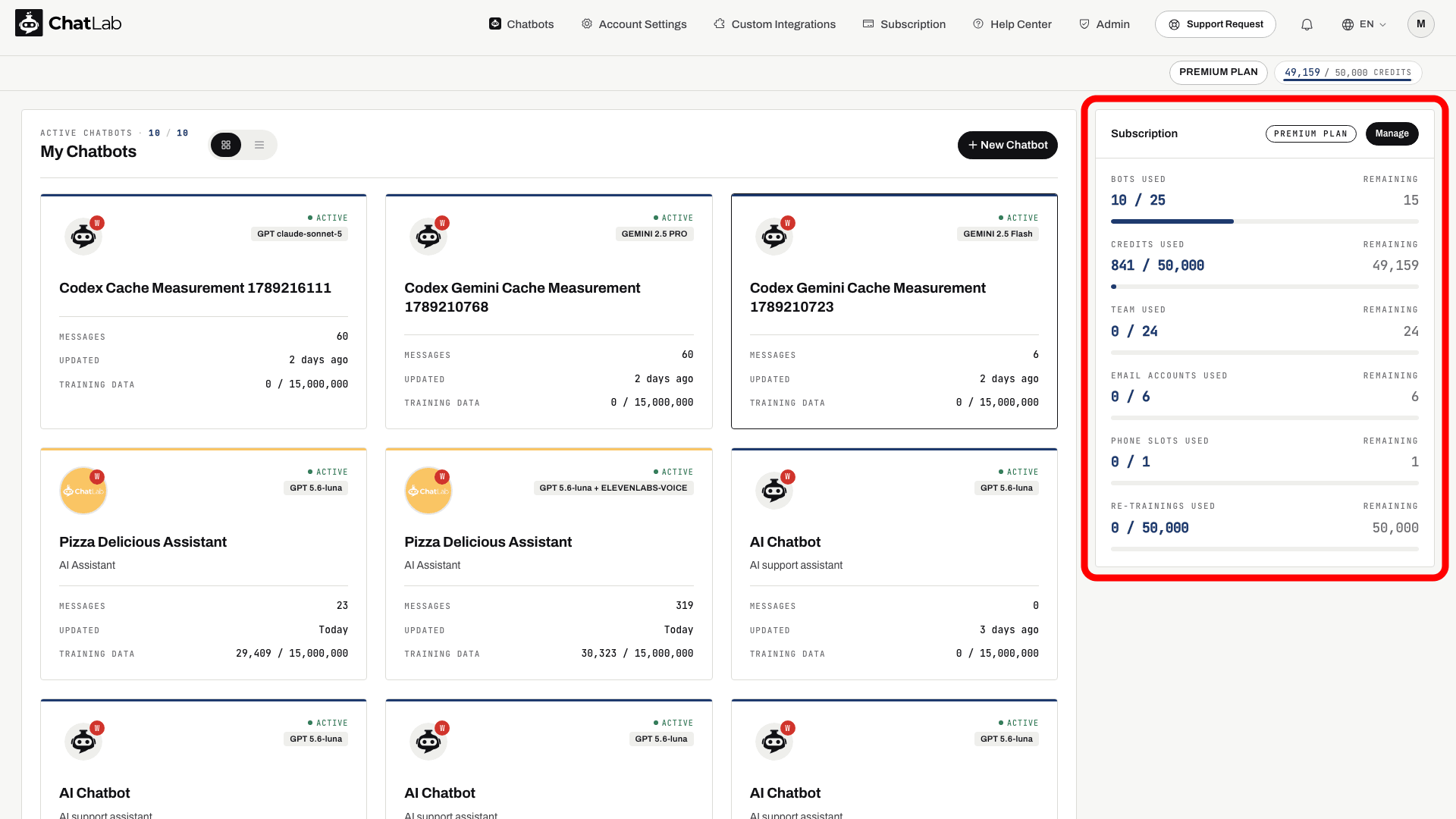
Jede Zeile zeigt links, wie viel Sie bereits verbraucht haben, und rechts, wie viel noch verbleibt. Für Credits sehen Sie sich den Balken CREDITS USED an:
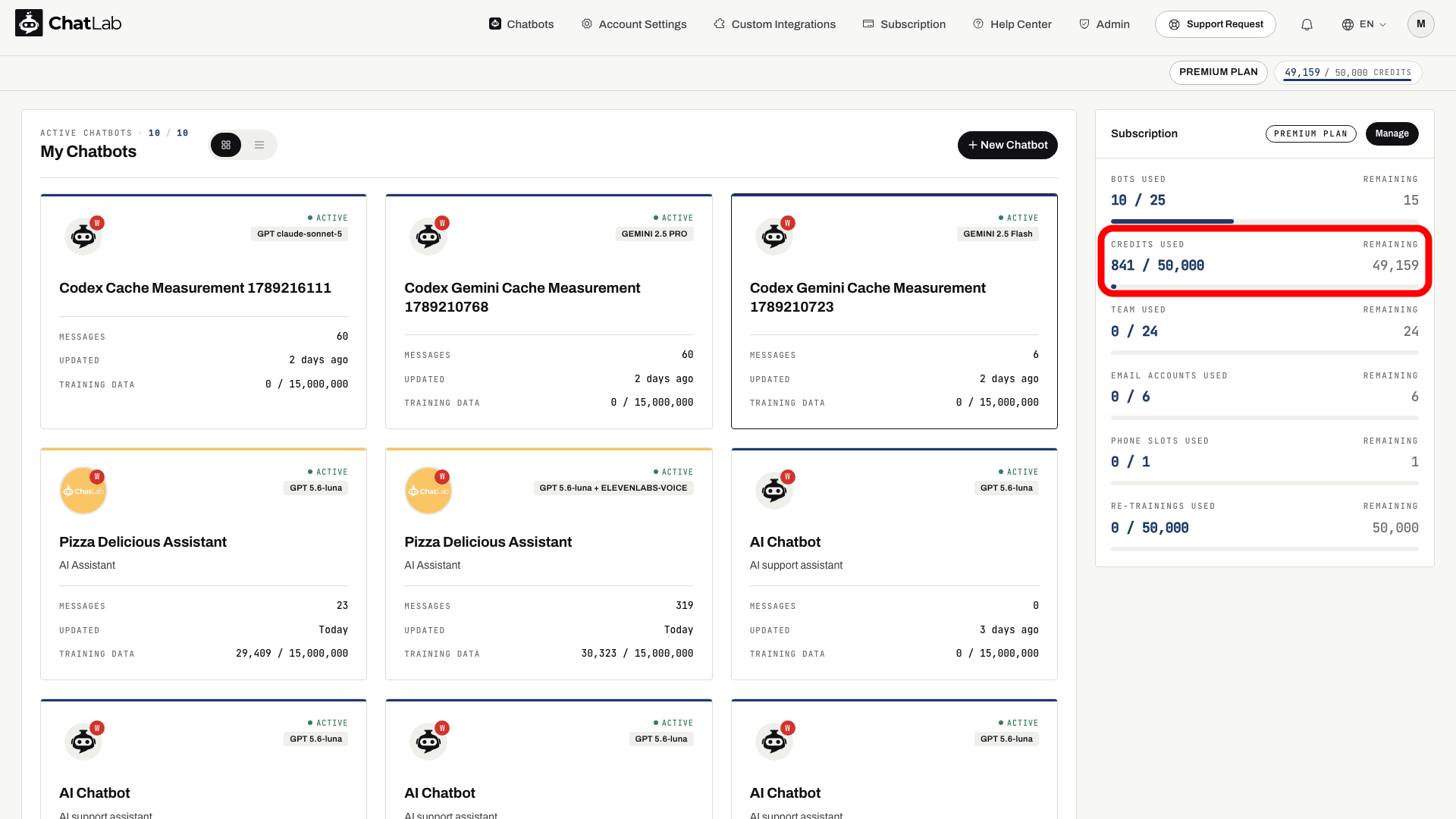
Beachten Sie den Unterschied: Dieser Bereich zeigt die in diesem Monat verbrauchten Credits an, während die Anzeige in der Kopfzeile die verbleibenden Credits angibt.
Der Bereich zeigt:
- BOTS USED - Anzahl der erstellten Chatbots im Vergleich zu Ihrem Plan-Limit
- CREDITS USED - in diesem Monat verbrauchte Nachrichten-Credits im Vergleich zum monatlichen Kontingent
- TEAM USED - eingeladene Teammitglieder im Vergleich zum Plan-Limit
- EMAIL ACCOUNTS USED - verknüpfte E-Mail-Konten im Vergleich zum Plan-Limit
- PHONE SLOTS USED - verbundene Telefonnummern für Voice im Vergleich zum Plan-Limit
- RE-TRAININGS USED - genutzte geplante Neutrainings im Vergleich zum Limit
Einige Zeilen erscheinen nur, wenn Ihr Plan die entsprechende Ressource enthält, daher zeigt Ihr Bereich möglicherweise weniger Balken an.
Klicken Sie im Kopfbereich des Feldes auf Manage (Verwalten), um die Abonnementseite zu öffnen.
Seite „Abonnement“
Navigieren Sie im Hauptmenü zu Subscription (Abonnement). Dasselbe Verbrauchspanel wird auf der rechten Seite neben Ihren Tarifdetails und den verfügbaren Add-ons angezeigt:
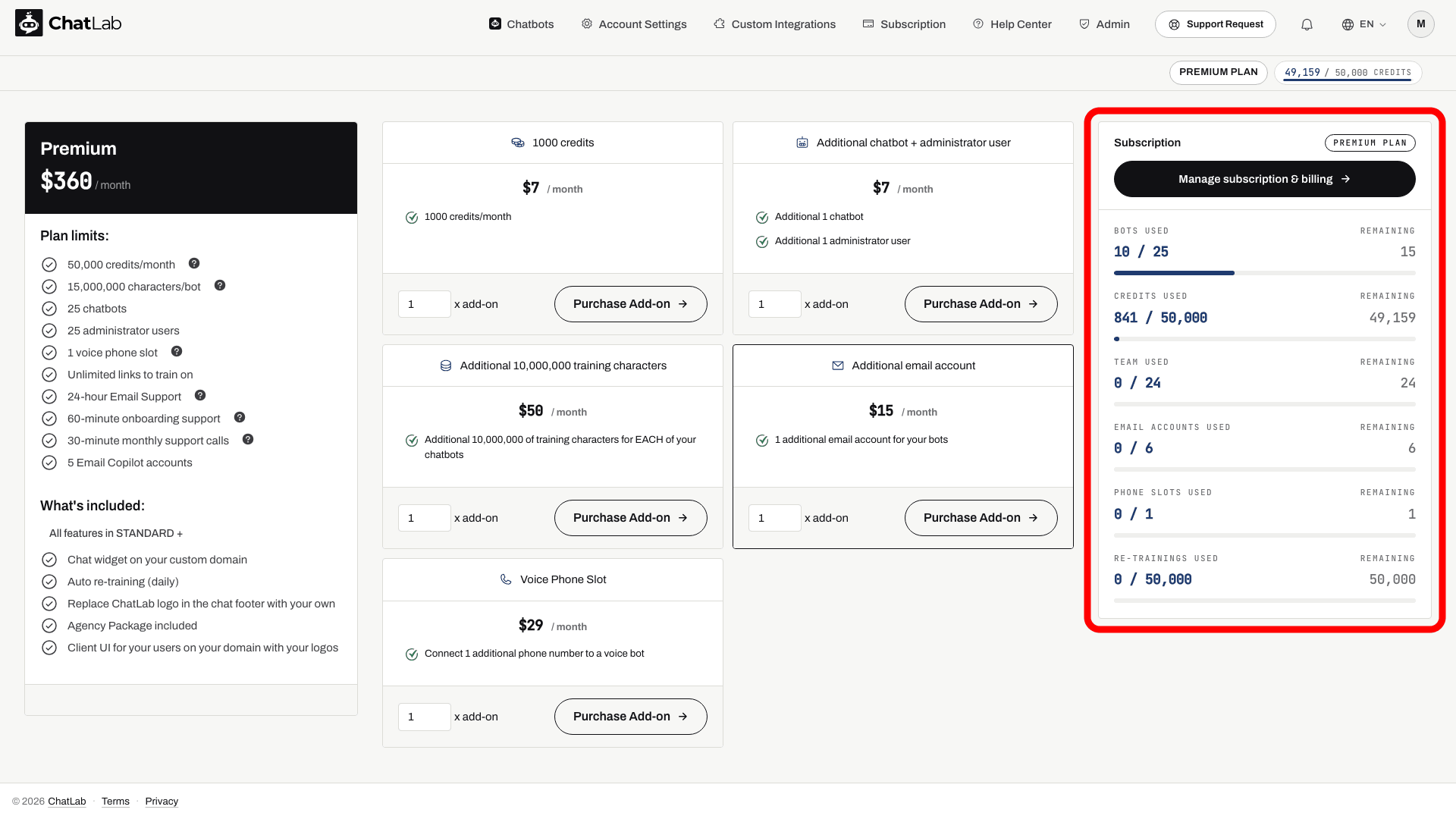
Hier können Sie auch Ihren Tarif upgraden, Add-ons erwerben (zum Beispiel zusätzliche Credits) und Manage subscription & billing (Abonnement und Abrechnung verwalten) nutzen, sofern verfügbar. Über Shopify verwaltete oder per Rechnung abgerechnete Konten können andere Optionen aufweisen.
Tab „Training“ (pro Chatbot)
Wählen Sie Ihren Chatbot aus und navigieren Sie zum Tab Training. Die Karte Limits unten links zeigt die Trainingsnutzung und die geltenden Limits des ausgewählten Chatbots an:
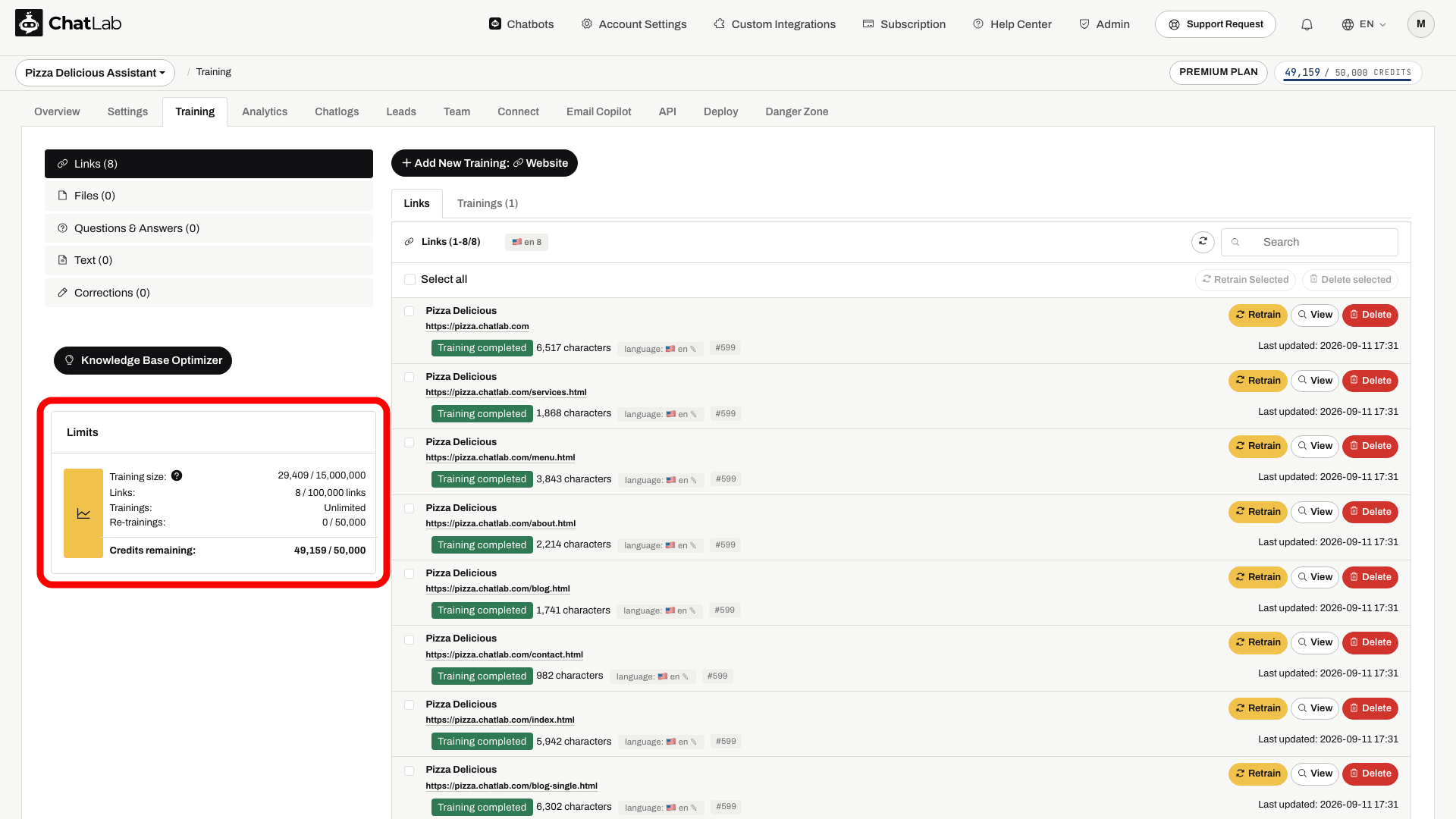
Die Karte zeigt:
- Trainingsgröße (Training size) - verwendete Zeichen an Trainingsdaten im Vergleich zum Planlimit
- Links - Anzahl der trainierten Website-URLs im Vergleich zum Limit
- Trainings - Trainingsvorgänge (Unbegrenzt)
- Neutrainings (Re-trainings) - verwendete geplante automatische Neutrainingsläufe im Vergleich zum Limit
- Verbleibende Credits (Credits remaining) - in diesem Monat verbleibende Nachrichten-Credits im Vergleich zum monatlichen Kontingent
Informationen dazu, was für die Limits von Trainingsgröße und Links zählt, finden Sie unter Trainieren Ihres Chatbots - Grundlagen und Limits.
Hinweis: Nachrichten-Credits werden zu Beginn jedes Kalendermonats zurückgesetzt, unabhängig davon, an welchem Tag des Monats Sie das Abonnement abgeschlossen haben.