Aktionen in Email Copilot verbrauchen Message Credits aus Ihrem monatlichen Kontingent.
Verbrauch von Nachrichten-Credits
- Antwort vorschlagen (Suggest Response) - die aktuelle Implementierung erfasst 1 Credit pro erfolgreichem neuen Vorschlag
- Eingehende E-Mail übersetzen (Translate incoming email) - 1 Credit pro Übersetzung
- Antwortentwurf übersetzen (Translate response draft) - 1 Credit pro Übersetzung
- E-Mails senden (Sending emails) - verbraucht keine Nachrichten-Credits
Das Fragezeichen neben Antwort vorschlagen (Suggest Response) zeigt eine Schätzung an, die auf Copilot-Einstellungen > Modell (Copilot Settings > Model) und Kontextgröße (Context Size) basiert. Diese Schätzung weicht derzeit von der oben beschriebenen Erfassung von 1 Credit ab. Dies sind separate Einstellungen, die unabhängig vom Konversationsmodell des Chatbots gelten. Wenn Sie einen zwischengespeicherten Vorschlag oder eine Übersetzung erneut öffnen, wird keine neue Anfrage gestellt.
Limits und Kontingente
- Schwellenwert für die Bereinigung von Kontonachrichten: 500, über alle Ordner hinweg
- Standardmäßige E-Mail-Aufbewahrung: 1 Tag
- Maximale E-Mail-Aufbewahrung: 10 Tage
- Tägliches Sendelimit: 1-300 (konfigurierbar, Standard: 100)
- Maximale Empfängeranzahl pro E-Mail (An + Cc + Bcc): 20
- Maximale Anhanggröße pro E-Mail: 10 MB insgesamt
- Maximale E-Mail-Textgröße: 2 MB
- Papierkorb-Kapazität: 50 E-Mails
- E-Mail-Abrufintervall: alle 30 Minuten (automatisch)
E-Mail-Aufbewahrung und Bereinigung
E-Mails werden automatisch anhand von zwei Regeln bereinigt:
- Altersbasierte Bereinigung - E-Mails, die älter als die konfigurierte Aufbewahrungsdauer sind, werden nächtlich gelöscht. Die Standardeinstellung beträgt 1 Tag, anpassbar von 1 bis 10 Tagen
- Mengenbasierte Bereinigung - derselbe nächtliche Job entfernt ältere gespeicherte Nachrichten, wenn das Konto den Schwellenwert von 500 Nachrichten überschreitet, über alle Ordner hinweg
Die Aufbewahrungsdauer wird ab dem Zeitpunkt gemessen, an dem die Nachricht oder der Entwurf in ChatLab gespeichert wurde, nicht ab dem ursprünglichen E-Mail-Datum des Absenders. Entwürfe, gesendete Kopien und Anhänge unterliegen ebenfalls der Bereinigung. Behalten Sie alles, was Sie langfristig benötigen, in Ihrem regulären Mail-System. Das Löschen der in ChatLab gespeicherten Kopie ist unabhängig von Delete from server after fetch (Vom Server nach Abruf löschen), wodurch E-Mails beim aktivierten Abruf vom Anbieter gelöscht werden.
Anpassen der Aufbewahrungsdauer
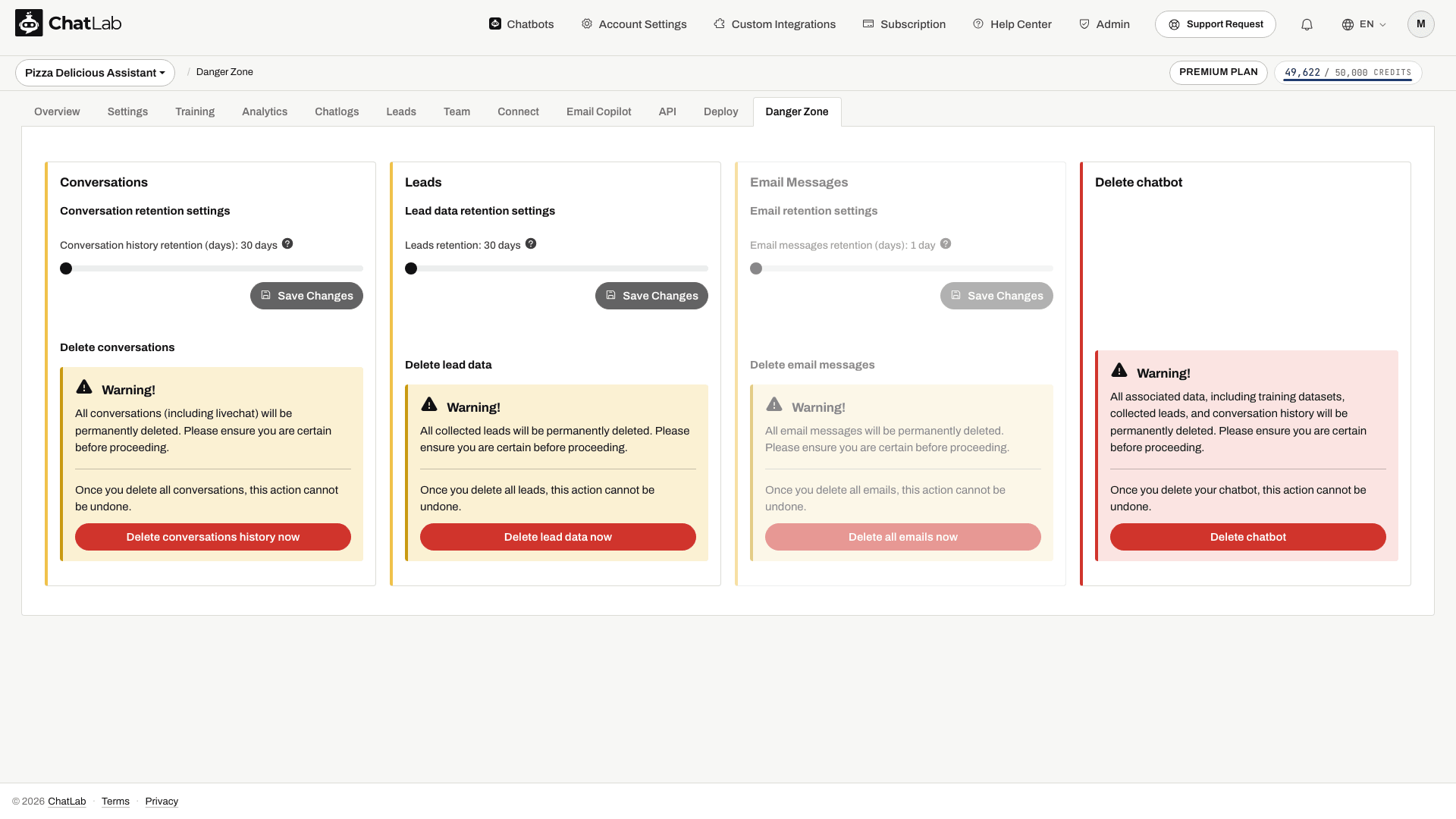
Wählen Sie Ihren Chatbot aus, navigieren Sie zu Danger Zone (Gefahrenzone) und scrollen Sie zum Abschnitt Email Messages. Verwenden Sie den Schieberegler, um die Aufbewahrungsdauer zwischen 1 und 10 Tagen einzustellen, und klicken Sie anschließend auf Save Changes (Änderungen speichern).
Alle E-Mails löschen
Klicken Sie im selben Abschnitt auf Delete all emails now (Alle E-Mails jetzt löschen), um alle gespeicherten E-Mails unwiderruflich zu entfernen. Diese Aktion kann nicht rückgängig gemacht werden. Überprüfen Sie den ausgewählten Chatbot und bestätigen Sie das Löschen nur, wenn Sie dessen gespeicherte E-Mails und Anhänge wirklich entfernen möchten.