What is ChatLab?
ChatLab is a website AI chat that can be easily integrated into your website. It is powered by OpenAI ChatGPT and Google Gemini, state-of-the-art AI models that can speak like a real person and help your clients. ChatLab can be trained with your own data, so it can answer questions specific to your business.
New to ChatLab? Check out our tutorial videos or learn how to create your first chatbot.
Training Your Chatbot
How do I train the chatbot to know my business?
The easiest way is to point ChatLab to your website. You just provide the website address and ChatLab does the rest. ChatLab will read your whole website and that is the best starting point. Learn more about adding website sources and training basics and limits.
If you have additional documents (PDF, DOC, CSV, XLS, TXT), you can also upload files. There is no special requirement on their layout or appearance. You can also add plain text or questions and answers directly.
For advanced users, ChatLab supports markdown syntax for better formatting. Need to reduce training data size? See our guide on how to reduce training characters.
Deploying Your Chatbot
How do I deploy the ChatLab chat widget to my website?
After creating the chatbot you will get a code snippet that you can copy and paste into your website. The website chat widget will appear on your website and will be ready to answer questions. The whole process takes less than 5 minutes. Learn more about adding your chatbot to your website.
We have specific guides for popular platforms:
You can also send a direct link to your chatbot for testing or sharing. Learn about the difference between widget and iframe deployment options.
Use Cases
How can I use ChatLab for Customer Support?
You can use ChatLab for customer support by training it with your customer support data. You can provide ChatLab with your customer support scripts, FAQs, and other documents. ChatLab will then be able to answer your customers' questions. ChatLab is an AI customer support chatbot that can fully automate responding to the basic questions your customers may have.
You can also set up a human support contact form to redirect conversations to your customer support team when necessary. With our Live Chat feature, you can provide your customers with a live chat option to talk to your customer support team directly. For teams, see live chat setup with multiple operators.
Want to collect customer information? Set up lead collection to gather names, emails, and phone numbers.
How can I use ChatLab AI chatbot for E-Commerce?
ChatLab has built-in features to integrate with major e-commerce platforms. Learn how to set up ChatLab for your e-commerce store:
- Shopify integration
- WooCommerce integration
- PrestaShop integration
- Wix integration
- CS-Cart integration
- Abicart integration
- BaseLinker integration
You can use ChatLab to answer questions about your products, provide product recommendations, and help your customers with their orders (e.g. order status, shipping details). Enable the products view feature to display product cards directly in the chat.
Can I integrate the ChatLab AI chatbot with my custom backend system?
Yes! Using our AI actions editor you can build any custom integration with any backend system that can expose data via API endpoints. For more complex integrations, see custom API integrations. For example, you can make the chatbot check the availability of a product in your warehouse, check the status of an order in your ERP system, or check the current balance on the customer account.
Languages and Customization
Is there support for other languages?
Yes, you can train the chatbot in any language. You can provide additional instructions to the chatbot to answer only in a selected language. By default, the chatbot answers in the language of the question. That is also the case when the language of the question is different than the language in which the chatbot has been trained. This means that you can train the chatbot in English and it will answer in Spanish if asked in Spanish.
Learn more about chatbot language setup.
Can I give the chatbot custom instructions?
Yes, you can give the chatbot custom instructions. You can tell it to answer only in a selected language, give it a name and custom personality, and adjust it in any way that would make it more suitable for your business. See our guide on role and behavior settings and custom instructions.
For appearance customization, learn about selecting avatar, colors and chat icon and conversation settings. You can also enable dynamic suggested follow-ups and human-like messaging for a more natural experience.
Technical Details
How does ChatLab work?
ChatLab is an AI chatbot platform that uses OpenAI GPT and/or Google Gemini (which we call AI providers) to answer your clients' questions. In order for the AI provider to understand your business, ChatLab reads your website and other documents you provide. It then uses the AI provider to answer questions.
The AI Provider is trained on a large corpus of text from the internet, so it has a lot of knowledge about the world. ChatLab uses knowledge from your website and combines it with the knowledge from the AI Provider to answer your clients' questions. The knowledge that you provide is always prioritized over the knowledge from GPT. ChatLab stores your knowledge in a vector database, extracts the most relevant knowledge, and provides it to GPT to answer the question.
You can select your AI model and extend the chat context size for longer conversations. Enable chatbot summaries and memory for better context retention across sessions.
Does ChatLab work on mobiles?
Yes, ChatLab works on mobiles, tablets, and desktops. It is fully responsive and adapts to the screen size.
Do I need to code to use ChatLab?
No. ChatLab serves as a no-code platform for creating AI chatbots. You can design your personalized custom website chatbot widget with our AI chatbot builder in less than five minutes and then integrate it into your website.
For developers who want programmatic access, we offer a Chat API.
AI Models and Pricing
Which version of GPT and Gemini does ChatLab use?
ChatLab uses GPT-5-mini by default. In paid plans, you can also use the newest GPT-5 and GPT-5.1. In case the chatbot is using GPT-5, it consumes 5 credits/message; in case of GPT-4.1, it consumes 5 credits/message; Mini models cost 1 credit/message. You can also switch to Google Gemini 3 Pro (10 credits/message), Gemini 3 Flash (1 credit/message), Gemini 2.5 Pro (10 credits/message), and Gemini 2.5 Flash (1 credit/message).
Learn more about selecting AI model and what is a message credit.
Billing and Subscription
Is there a free trial?
Yes, new users receive a 7-day free trial when subscribing to a Basic or Standard plan. During the trial you have full access to all features included in your selected plan. You will not be charged until the trial period ends.
Where can I enter the invoice details?
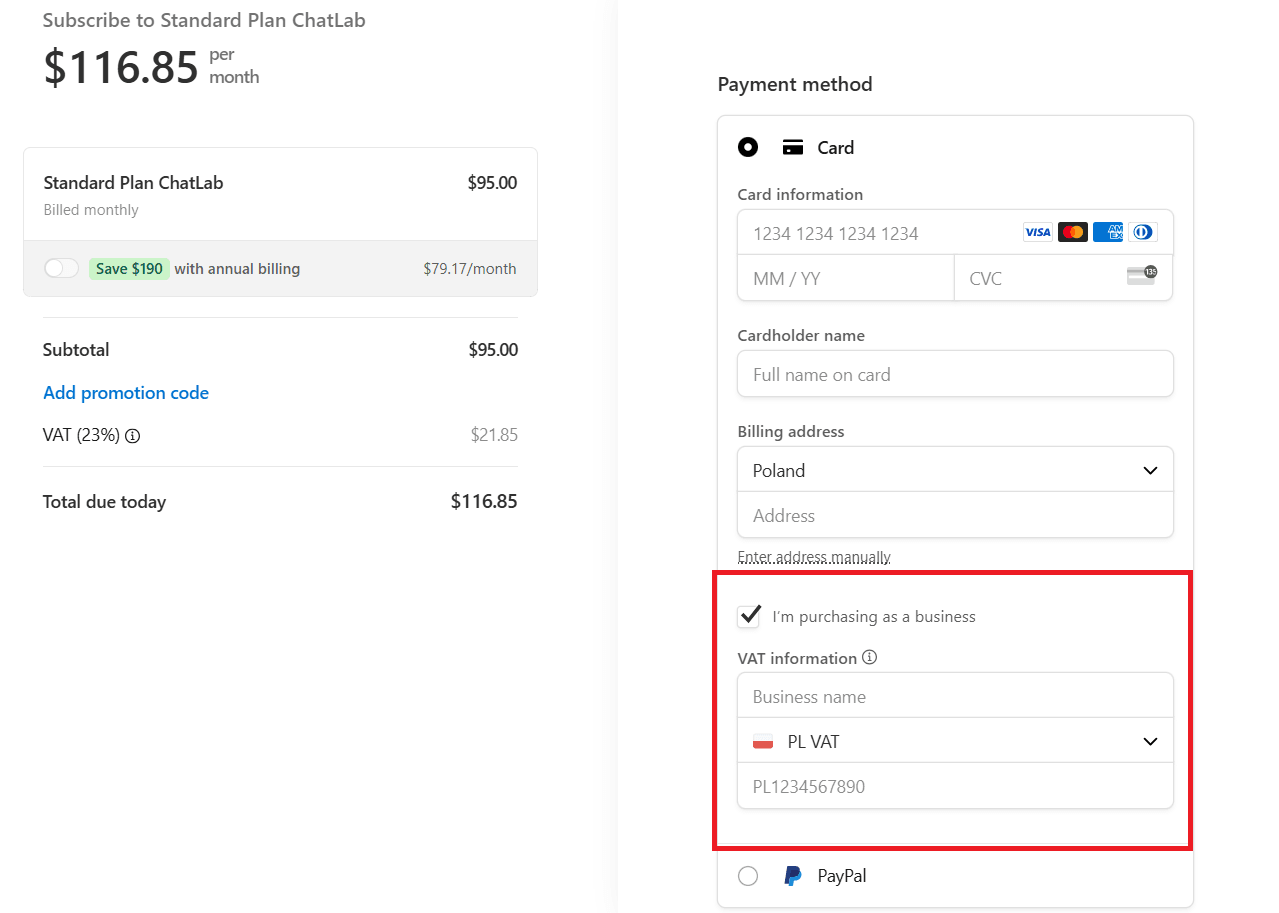
When making a payment for your subscription you are redirected to the purchasing page. If you want to buy our products for your company, look below the payment method and billing address. You'll find a checkbox labeled "I'm purchasing as a business". Check this box, select your country, and then you'll be able to enter the necessary company details including VAT information.
Where can I manage my subscription?
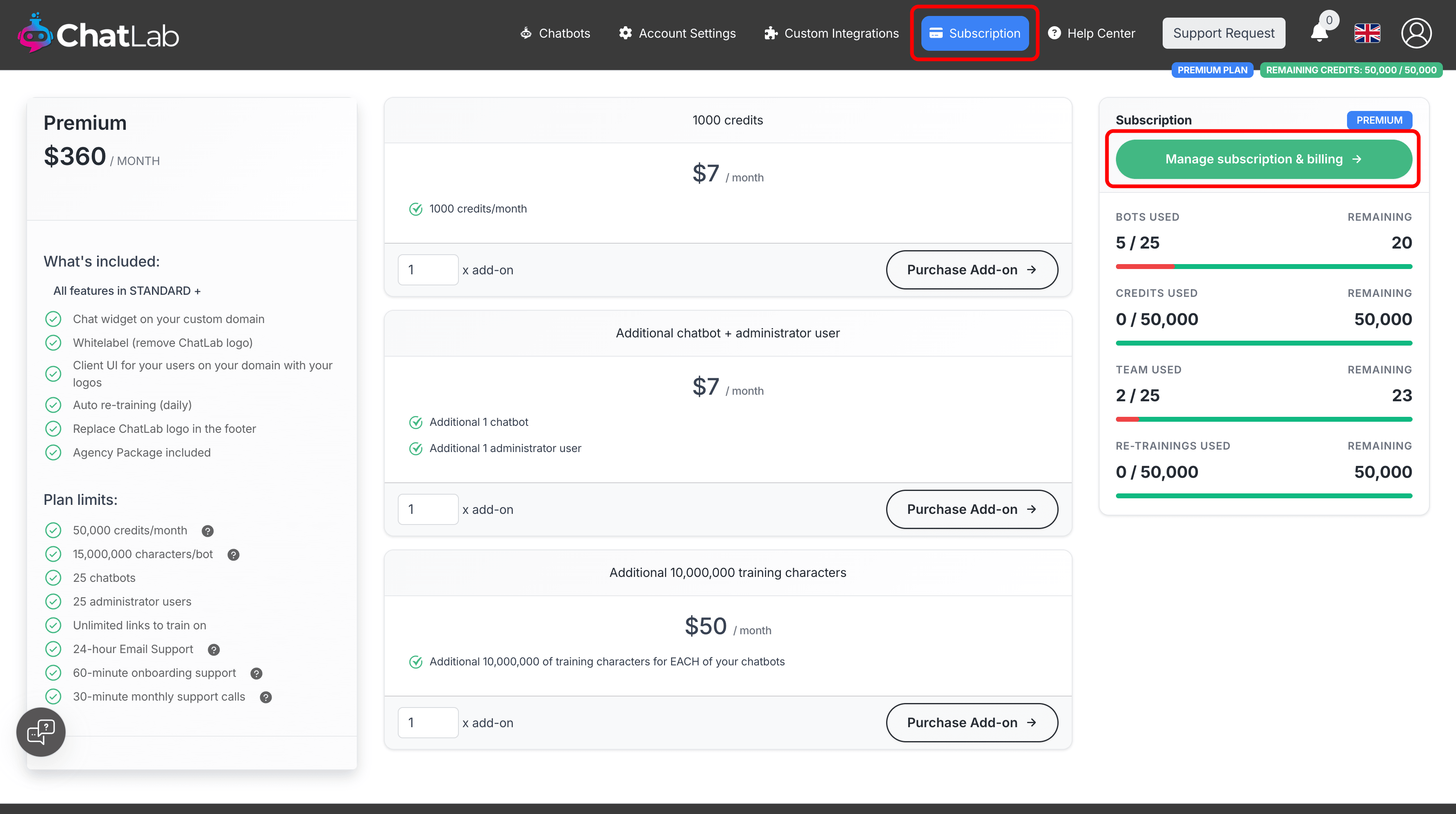
To manage your subscription, navigate to the Subscription panel in your ChatLab administration dashboard. Once you are in the Subscription section, click on Manage subscription & billing.
At the top of this page, you will see your current subscription. You can upgrade/downgrade your plan, update payment methods, view invoice history, or cancel your subscription.
Learn more about checking your current usage of credits and understanding training data limits.
Security and Privacy
ChatLab provides several security features to protect your chatbot:
- Security settings - Configure allowed domains and access controls
- Restricting domains - Limit where your chatbot can be embedded
- Rate limits - Prevent abuse and control usage
- GDPR compliance - Load chatbot only after user consent
Accessibility
Is ChatLab compatible with WCAG?
Yes, ChatLab is compatible with WCAG. Our chatbot widget has been designed with accessibility in mind, meaning that it can be fully operated using a keyboard. It is also compatible with screen readers, providing access to content and functions for every user.
We strive to make our solutions accessible to the widest possible range of users.
Analytics and Monitoring
ChatLab provides tools to monitor and improve your chatbot:
- Chatbot analytics - View conversation statistics and trends
- AI conversation insights - Get AI-powered analysis of conversations
- Chatlogs - Review individual conversations
- Conversation rating - Collect user feedback
- Daily summary email - Receive daily activity reports
Want to improve responses? Learn about adding and editing corrections and how to improve chatbot responses.
Team Collaboration
Share your chatbot with team members:
- Inviting administrators - Add team members to manage your chatbot
- Managing incoming live chat conversations - Handle live chat as a team
For agencies, learn how the agency program works and about custom domains and custom user portal.
Free Plan Policy
Inactive Chatbot Policy on Free Plan
If you are on a Free Plan, you have full access to all the tools available within that plan. By using your chatbot regularly, you ensure it will not be removed from our database. However, if our system detects that there has been no activity on your account for more than 10 days, the chatbot will be automatically deleted from our records. In such a situation, there will be no way to recover your previous chatbot, including its leads, settings, or conversation history. It will be permanently removed from our database.
Need to temporarily disable your chatbot instead of deleting it? Learn about pausing and unpausing chatbots. If you need to remove your chatbot or data, see deleting your chatbot and deleting your data.
Troubleshooting
Having issues? Check these resources:
- Limitations and common challenges
- Training in background - Understand how background training works
- Re-training - Update your chatbot's knowledge
- Knowledge base optimizer - Improve training data quality